Feed Website Data Into OpenAI, Anthropic & Gemini APIs

Every serious AI application built in 2026 eventually runs into the same problem: the model is only as good as the data you feed it. Whether you're building a RAG pipeline, a customer-facing chatbot, or an internal agent that needs to answer questions about your own product, raw website HTML is almost never the right input. It's cluttered, inconsistent, and full of navigation noise that has nothing to do with the actual content a model needs to reason over.
developer-focused walkthrough of turning messy website content into clean, structured input for the OpenAI, Anthropic, and Gemini APIs and, just as importantly, how to verify your content is actually being picked up and cited once it's out there. We'll cover the tooling, the API-specific patterns for each provider, and how Google's June 2026 spam update should shape how you think about accuracy in whatever you build on top of this data.
Why Raw Website Data Doesn't Work as LLM Input
Before touching any API, it's worth understanding what is AI-ready data and why it matters so much for ingestion pipelines specifically. A typical web page is built for a visual browser full of navigation menus, sidebars, ads, cookie banners, and JavaScript-rendered widgets that a human eye filters out instantly but that a scraping script has no way to distinguish from the actual content without real effort.
Feed that raw mess directly into an LLM API call, and you get exactly the problems you'd expect: bloated token usage on irrelevant boilerplate, degraded retrieval accuracy in a RAG setup, and inconsistent extraction depending on how any given page happens to be structured. AI-ready data content that's been cleaned, structured, and stripped of visual noise solves this at the source, before it ever reaches a model.
How LLMs Parse Web Pages: The HTML-to-LLM Problem
Understanding how LLMs parse web pages explains exactly why this matters for API work specifically. When you pass raw HTML into a model's context window, it has to work through tags, CSS classes, and script remnants before reaching anything useful and that HTML to LLM conversion is lossy by nature. Content buried inside a JavaScript-rendered component may not appear in a simple HTML fetch at all, and a model has no reliable way to know it's missing something.
Markdown, by contrast, maps closely onto the structured text patterns these models were trained on. Clean headings, lists, and plain sentences parse far more reliably than a tangle of divs and spans. This is the entire reason a conversion step belongs at the front of any pipeline that pulls website content into an LLM API call skip it, and you're paying token costs for garbage input, then wondering why your RAG accuracy is inconsistent.
LLM vs Generative AI: A Fast Clarification for This Guide
Quick terminology note before diving into implementation: LLM vs generative AI is a distinction worth being precise about, since this guide focuses specifically on large language models the text-based systems behind OpenAI's GPT models, Anthropic's Claude, and Google's Gemini. Generative AI is the broader category that also includes image and video generation models, which use different architectures and ingestion patterns than the text-focused techniques covered here. If your pipeline also needs to handle visual content say, feeding product images into a best llm for image generation workflow for downstream asset creation that's a related but architecturally separate pipeline from the text-ingestion patterns below.
Step 1: Converting Your Website Into LLM-Ready Text
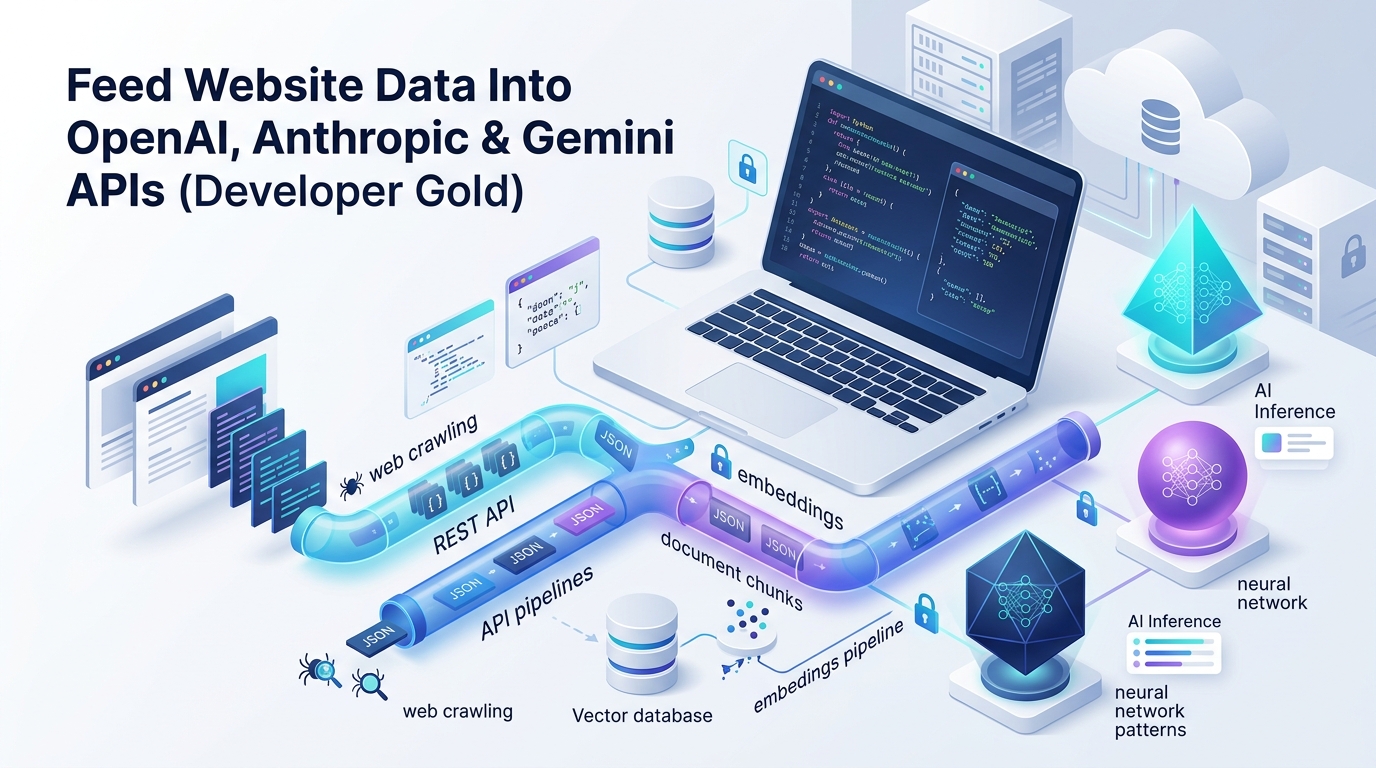
The first practical step in any ingestion pipeline is converting your site into clean, structured text, and the fastest way to do that at scale is an automated llms.txt file generator rather than a manual txt file creator process. The most widely used option is the Firecrawl llms.txt generator, a free tool that crawls your site, strips out navigation and boilerplate, and produces clean markdown for every accessible page.
To generate llms.txt for a site programmatically:
Point the crawler at your domain and let it map every accessible page.
Let the tool extract clean markdown content from each page, filtering out layout noise.
Review the AI-generated page summaries for accuracy before publishing.
Download both the standard llms txt file and a more detailed companion file for deeper content.
Store the raw markdown output separately from the summary file you'll want the full markdown for actual API ingestion, while the summary file is what you publish at yourdomain.com/llms.txt for AI crawlers.
For developers who want this fully automated, Firecrawl's API lets you script the entire crawl-and-convert step, triggering a refresh whenever your content management system publishes new content a meaningfully better setup than a one-time manual export that goes stale within a few months. This same conversion step, using any general-purpose text file generator built for this purpose, is what actually feeds every API pattern described below.
Feeding Data Into OpenAI's API
Once you have clean markdown content, the OpenAI API generally supports two ingestion approaches depending on your use case.
For direct context injection, you simply pass your cleaned markdown content directly into the prompt as context, which works well for smaller sites or focused Q&A applications where the relevant content fits comfortably within the model's context window. Structure your prompt clearly system instructions, then the source content wrapped in clear delimiters, then the user's actual question so the model can distinguish reference material from the live query.
For larger sites, a retrieval-augmented generation setup makes more sense: chunk your cleaned markdown into reasonably sized sections, generate embeddings for each chunk using OpenAI's embeddings endpoint, and store them in a vector database. At query time, retrieve the most relevant chunks based on semantic similarity to the user's question, then pass only those chunks into the completion call as context dramatically more token-efficient than stuffing an entire site into every request.
Feeding Data Into Anthropic's Claude API
Claude's API follows a broadly similar pattern, with a few practical differences worth knowing. Claude tends to perform particularly well with longer, well-structured context its larger context window makes direct injection of substantial markdown content a genuinely viable approach for many use cases that would otherwise require a full RAG setup.
When feeding cleaned website content into Claude, clear structural delimiters matter more than with some other models wrapping source content in explicit XML-style tags helps Claude reliably distinguish reference material from instructions, which becomes especially important when you're feeding in content from multiple pages or sources within a single request. For RAG-style setups at scale, the same embedding-and-retrieval pattern used with OpenAI applies here too, with Claude handling the final synthesis step once relevant chunks are retrieved.
Feeding Data Into Google's Gemini API
Gemini's API brings a genuine advantage for this specific use case: since it's built by the same company running the web's dominant search infrastructure, it tends to handle multimodal content combining text with images or video from a page more natively than either OpenAI or Anthropic's current offerings. If your website content includes meaningful visual information alongside text, Gemini's multimodal ingestion can process both in a single request rather than requiring a separate image-processing pipeline.
For pure text ingestion, the pattern mirrors the other two providers: clean markdown input, either injected directly for smaller content sets or chunked and embedded for larger-scale retrieval setups. Gemini's context window has also grown substantially, making direct injection viable for a wider range of use cases than it might have been a year or two ago.
Building an LLM-Ready Data Platform for Continuous Ingestion
A one-time export works for a prototype, but any production application needs to treat this as an ongoing pipeline rather than a manual task. This is where the concept of an llm-ready data platform matters automating the crawl-clean-embed cycle so your AI application's knowledge stays current as your website content changes.
A solid setup typically includes:
Automated re-crawling triggered by CMS publish events, rather than a manual monthly export
Version tracking on your embeddings, so stale content gets flagged and re-processed rather than silently persisting in your vector store
Consistent chunking logic applied uniformly across your content, so retrieval quality doesn't degrade as your site grows
A staging step where cleaned content gets reviewed before it feeds into a customer-facing application, catching extraction errors before they reach a live user
Being genuinely llm-ready at the platform level, rather than treating this as a one-off script, is what separates a demo from something that holds up in production.
Extending the Same Pattern to CRM and Internal Data
The same principles apply well beyond public website content. Many teams are now building out an ai-ready crm data model so internal AI tools can pull accurate information from sales records, support tickets, and product documentation using the exact same clean-then-embed pattern described above. Customer records scattered across disconnected systems with inconsistent field naming create the same retrieval problems as messy HTML standardizing field names, resolving duplicates, and tagging records with clear categories before embedding them produces dramatically more reliable results from any internal AI agent built on top of that data.
Using an LLM for Product Content Generation Downstream
Once your ingestion pipeline is live, a natural next step for many teams is using an LLM for product content generation feeding structured product data through the same pipeline to generate descriptions, comparison content, or FAQ sections at scale. The key to doing this well is feeding the model structured input specs, pricing, verified details rather than asking it to invent information, which keeps output accurate and reduces the kind of hallucinated detail that damages trust in an AI-generated content pipeline.
Speeding Up Development With an LLM Prompt Generator
If writing consistent, well-structured prompts for every stage of this pipeline summarization, extraction validation, content generation feels like its own bottleneck, an llm prompt generator can help standardize that process. These tools take a plain description of what you need and produce a structured prompt template, reducing the trial-and-error typically required to get consistent, well-formatted output across every API call in a larger pipeline.
After You Feed Your Data In: Tracking Whether It's Actually Being Cited
Here's the step most technical guides skip entirely: once your content is genuinely AI-ready and feeding into these APIs, you need a way to verify it's actually showing up when real users ask real questions through ChatGPT, Claude, Perplexity, or Google's AI Overviews. This is where LLM rank tracking and LLM SEO trackers come in a genuinely new tool category built specifically for this problem.
Unlike traditional rank tracking, which measures a static position on a results page, LLM rank tracker tools work by running a set of representative prompts against multiple AI models and checking whether, where, and how confidently your brand or content gets cited in the response. The strongest platforms in this category track metrics like mention frequency, share of voice against named competitors, and which source URLs a model actually pulled from giving you a genuine feedback loop instead of guessing whether your llms.txt file and clean content pipeline are actually working.
A handful of real platforms have emerged as the leading llm seo checker and llm visibility checkers options in 2026, each with a slightly different focus: some specialize in enterprise-scale sentiment and perception tracking across major AI models, others focus on affordable, straightforward citation monitoring for smaller teams, and a few integrate LLM visibility directly alongside traditional SEO rank tracking in a single dashboard. When evaluating llm seo tracking tools for your own pipeline, prioritize platforms that cover the specific AI models your actual audience uses, provide prompt-level detail rather than just a single aggregate score, and let you benchmark directly against named competitors a raw "visibility score" without competitive context tells you far less than it initially appears to.
Running this kind of llm seo analysis tool periodically against your own content is the closest thing available right now to closing the loop on everything covered earlier in this guide confirming that clean, AI-ready data genuinely translates into real citations, not just a technically correct pipeline that nobody's model is actually pulling from.
Accuracy Matters More After the June 2026 Spam Update
It's worth connecting all of this back to a broader principle shaping content and data strategy in 2026. Google's June 2026 spam update, its second major spam update of the year, expanded enforcement specifically against content and technical tactics designed to manipulate rankings or AI-generated answers rather than genuinely help a reader or an AI system understand something accurately. None of the techniques in this guide run afoul of that principle when used honestly cleaning your content and feeding it accurately into an LLM API is exactly the kind of technical work that improves genuine AI understanding.
The risk shows up only in misuse: feeding fabricated or misleading structured data into a pipeline specifically to manipulate what an AI system says about your brand, or generating an llms.txt file stuffed with irrelevant claims rather than an honest summary of what your site actually contains. Used properly, this entire workflow is squarely aligned with where both search and AI visibility are heading accurate, well-structured, genuinely useful data wins over manufactured signals every time.
A Developer Checklist for This Pipeline
Convert your site to clean markdown using a tool like Firecrawl before any API ingestion begins.
Choose direct injection vs. RAG based on your content volume small, focused sites can often skip embeddings entirely.
Match your ingestion pattern to each provider's strengths Claude's large context window for direct injection, Gemini for multimodal content, OpenAI's mature embeddings ecosystem for RAG at scale.
Automate re-crawling so your pipeline reflects new content without manual intervention.
Standardize your CRM and internal data using the same clean-then-embed pattern for internal AI tools.
Track your actual AI visibility with a dedicated LLM SEO checker rather than assuming your pipeline is working.
Keep every step honest accurate source data, not manufactured signals, especially given tightening spam enforcement in 2026.
Final Thoughts
Feeding website data into OpenAI, Anthropic, and Gemini's APIs isn't a single technique it's a pipeline, and the quality of everything downstream depends entirely on how clean and structured the input is at the start. Get the conversion step right with a proper llms.txt file generator, match your ingestion pattern to whichever provider's API you're building on, and close the loop with genuine visibility tracking rather than assuming the pipeline works just because it runs without errors.
Done properly, this is genuinely developer gold: a repeatable, automatable system that turns a messy website into something every major LLM can accurately understand, cite, and build useful answers from.
Written by
Alex
Creative blogger sharing insights, stories, and fresh ideas.