Next.js Blog with CMS: 8 Best Headless Options Compared


You built a Next.js blog, connected a headless CMS and hit publish. Then the post took an hour to appear, the preview button needed a cookie workaround, and the sitemap still listed last month's URLs.
Most CMS reviews compare editors and pricing. This one adds a test that matters more in October 2026: does the CMS help your posts get found and cited, by Google and by AI answer engines like ChatGPT, Perplexity, Gemini and Google AI Overviews?
Below, eight options are compared on freshness, preview, SEO output, writer workflow, pricing and vendor risk. Each gets an honest "best for" line, and there's a short code pattern for instant revalidation you can use with any of them.
Key takeaways
Pick a CMS by what your blog must output (fresh pages, sitemaps, metadata, structured data), not by how many content types it can model.
Stale content is usually a cache problem. Tag your fetches and revalidate from a logged webhook.
General-purpose CMSs (Sanity, Contentful, Strapi, Payload) are flexible but leave most blog SEO for you to build.
Blog-specific tools trade flexibility for speed: less schema work, more built in, narrower scope.
Weigh vendor risk. Acquisitions and paused services in 2026 changed the picture for several popular options.
What does a Next.js blog actually need from a CMS?
A Next.js blog needs a CMS that stores posts, authors and tags, tells your site the moment something changes, supports draft preview, and gives you the fields to output good metadata, sitemaps and structured data. Writers should be able to publish and fix SEO without opening a pull request.
That sounds basic, but it's where most setups break. These are the six problems this comparison checks for:
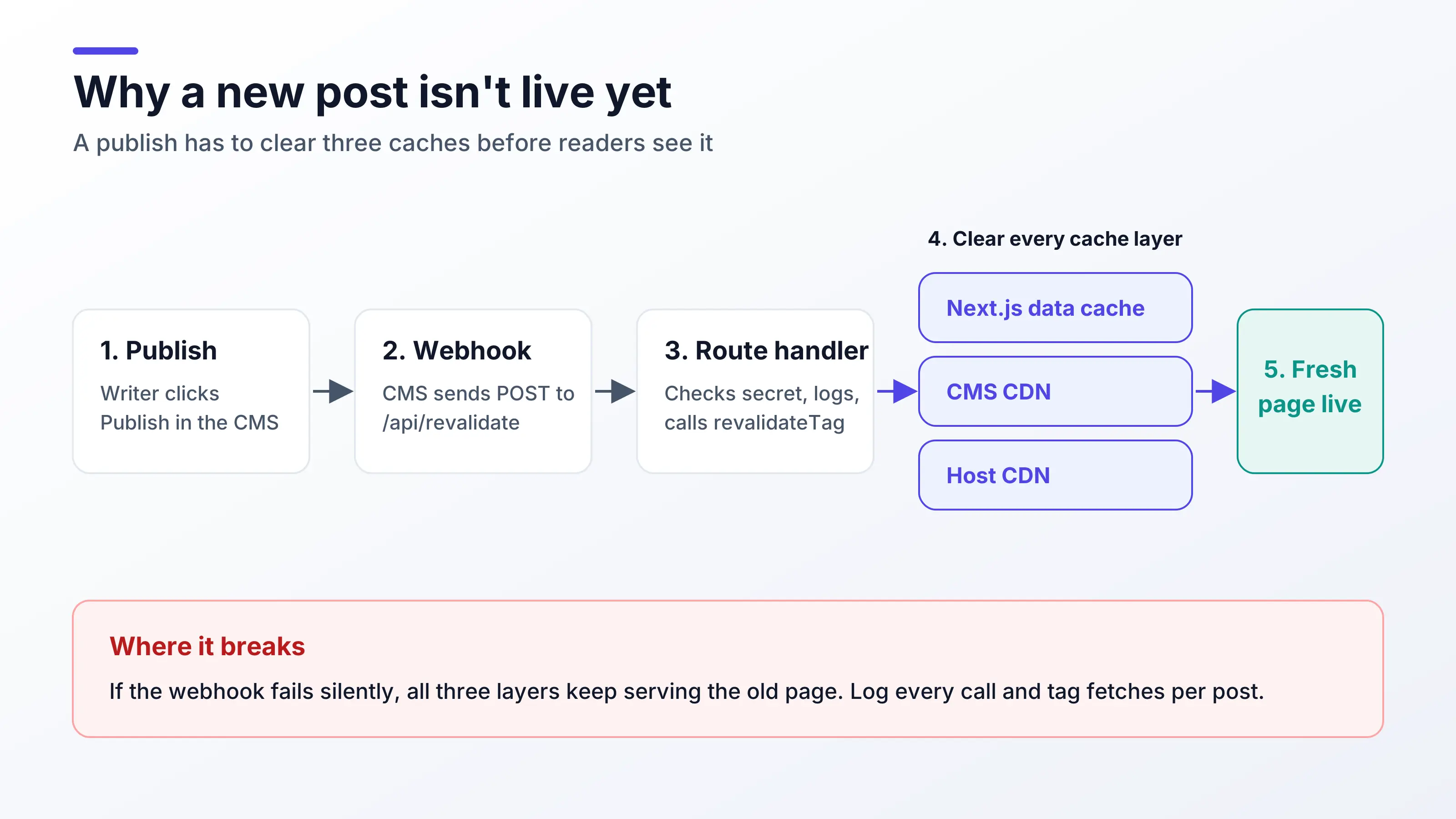
Stale content after publishing. A post can be cached in three places: the Next.js data cache, the CMS's CDN and your host's CDN. If the webhook that clears them fails silently, nobody notices until a reader does.
Complex draft preview. Next.js Draft Mode works, but wiring it to a CMS means preview tokens, a route handler and cookies that can break across domains.
No SEO output. Headless CMSs store content. They don't generate your sitemap, meta tags, JSON-LD, Open Graph images or redirects. You build those in Next.js.
Marketers waiting on developers. If changing a meta description or scheduling a post needs a deploy, publishing slows down.
Pricing cliffs. Some free tiers jump straight to a large monthly bill once you pass a seat or record limit.
Vendor risk and overkill. General CMSs can mean days of schema design for what is really five content types. And in 2026, acquisitions and paused services forced some teams to re-plan.
One more point is easy to miss: MDX in your repo works well for developers, but it shuts out non-technical writers. Notion as a CMS has its own catches, including API limits of roughly 3 requests per second and image URLs that expire after about an hour.
Why does AI-citation readiness matter when choosing a blog CMS?
AI answer engines quote pages they can crawl, parse and trust as current. Your CMS shapes that indirectly: it decides whether you have clean fields for titles, descriptions, authors and dates, whether updates reach the live page quickly, and whether your sitemap and structured data stay accurate without manual work.
In practice, "AI-citation readiness" for a Next.js blog comes down to a short checklist:
Server-rendered HTML. Render posts on the server (static or ISR) so crawlers see full content without running JavaScript. See how LLMs parse web pages.
Structured content, not one big blob. Separate fields for title, excerpt, author, published and updated dates make clean JSON-LD
Articlemarkup easy.Accurate freshness signals.
lastModifiedin your sitemap and a visible "updated" date should match reality. That depends on reliable revalidation.Clear question headings and direct answers. This is an editorial habit, but a CMS with SEO guidance in the editor helps writers keep it.
Internal links between related posts. They help both crawlers and readers understand which page is the authority on a topic.
Skip the shortcuts. Some teams publish an llms.txt file, but Google says its AI Overviews and AI Mode don't use it, and crawler-log studies show AI bots rarely request it. Server-rendered HTML with a clean structure does the real work.
How do you stop stale content after publishing in Next.js?
Tag every CMS fetch with a cache tag, then expose a route handler that your CMS webhook calls on publish. The handler checks a shared secret and calls revalidateTag, which clears only the affected pages. Log every call, so a failing webhook shows up in your logs instead of staying silent.
This pattern works with any CMS on this list. First, tag the fetch:
// lib/cms.ts
export async function getPosts() {
  const res = await fetch(process.env.CMS_POSTS_URL!, {
    headers: { Authorization: `Bearer ${process.env.CMS_TOKEN}` },
    next: { tags: ['posts'] },
  });
  if (!res.ok) throw new Error(`CMS fetch failed: ${res.status}`);
  return res.json();
}

export async function getPost(slug: string) {
  const res = await fetch(`${process.env.CMS_POSTS_URL}/${slug}`, {
    headers: { Authorization: `Bearer ${process.env.CMS_TOKEN}` },
    next: { tags: ['posts', `post:${slug}`] },
  });
  if (!res.ok) return null;
  return res.json();
}
Then add the webhook endpoint:
// app/api/revalidate/route.ts
import { revalidateTag } from 'next/cache';
import { NextRequest, NextResponse } from 'next/server';

export async function POST(req: NextRequest) {
  const secret = req.headers.get('x-webhook-secret');
  if (secret !== process.env.REVALIDATE_SECRET) {
    console.warn('[revalidate] rejected: bad secret');
    return NextResponse.json({ ok: false }, { status: 401 });
  }

  const body = await req.json().catch(() => ({}));
  const slug: string | undefined = body?.slug;

  // Next.js 16: { expire: 0 } expires the tag immediately, which suits publish webhooks.
  // Use 'max' instead if serving a stale page while it refreshes is acceptable.
  revalidateTag('posts', { expire: 0 });
  if (slug) revalidateTag(`post:${slug}`, { expire: 0 });

  console.info('[revalidate] ok', { slug, at: new Date().toISOString() });
  return NextResponse.json({ ok: true, slug });
}
Two details matter. Tagging per post (post:${slug}) keeps one edit from clearing your whole site. And if your host or CMS adds its own CDN layer, check that it respects Next.js cache headers, or you'll fix one cache and still serve stale pages from another.
In Next.js 16 the one-argument revalidateTag(tag) is deprecated, so always pass a profile. If you've turned on Cache Components (cacheComponents: true), tag cached functions with cacheTag inside a "use cache" scope instead of next.tags; the webhook stays the same.
What is the best headless CMS for a Next.js blog in 2026?
There's no single best choice. Sanity and Contentful suit teams with content beyond the blog. Payload, Strapi and Outstatic suit developers who want control. Ghost suits newsletter-first creators. Blog-focused headless tools suit teams that mainly want a fast, SEO-ready blog with little setup.
The entries below follow the same format: best for, what works well, where it falls short for a blog, and how it scores on AI-citation readiness. The first entry leads because it's the only option here built solely for blogs with SEO in the product; the rest follow by type, and each best-for line says when that option is the better choice.
1. ContioReach
Best for: SaaS, startup and enterprise teams that want a blog with SEO built in, where marketers publish without waiting on developers.
Works well: ContioReach is a headless CMS built specifically for blogs, with built-in SEO, sitemaps, internal linking and instant revalidation for Next.js, Astro and Nuxt. Posts, authors, tags, categories and SEO fields come ready out of the box. A REST API returns JSON, publishing triggers a webhook so the site revalidates without a redeploy, and the editor adds SEO and GEO guidance, semantic internal linking and Google Search Console indexing and tracking. AI-assisted drafting includes an expert review step and uses your own Anthropic key. The free plan covers 60 posts with all features. Details and the official Next.js 16 App Router starter are at ContioReach docs.
Falls short for a blog: it's blog-only by design, so it won't model product pages or app content. There's no self-hosting, which rules it out if you need either. Check the docs for draft preview before you commit.
AI-citation readiness: strong by default, since sitemaps, internal linking and SEO and GEO guidance are part of the product rather than your code. Learn more at ContioReach.
2. Sanity
Best for: content teams that need structured content across a site, app and blog, with developers to build the front end.
Works well: a customizable React-based editor (Sanity Studio), the GROQ query language and real-time collaboration. The official next-sanity package adds Visual Editing in the Presentation tool, live content and webhook-based revalidation.
Falls short for a blog: you design the schema yourself, and SEO output (sitemaps, JSON-LD, OG images) is your code. The Free plan allows up to 20 seats; Growth costs $15 per seat per month, plus metered usage and paid add-ons.
AI-citation readiness: strong, if you build it. Structured fields make clean markup easy; nothing is generated for you.
3. Payload
Best for: TypeScript developers who want the CMS to live inside their Next.js codebase and are comfortable self-hosting.
Works well: code-first TypeScript config, an admin panel and backend that install directly into your Next.js /app folder, auto-generated REST and GraphQL APIs, and your choice of MongoDB, Postgres or SQLite.
Falls short for a blog: it's a general framework, so blog models and SEO are yours to build. Payload joined Figma, and Payload Cloud paused new projects, so plan for your own hosting.
AI-citation readiness: depends entirely on what you build. Same-repo setup makes revalidation simple.
4. Strapi
Best for: teams that want an open-source, self-hosted CMS with a familiar admin panel and REST or GraphQL APIs.
Works well: a visual content-type builder, a plugin marketplace, a free self-hosted Community edition and managed hosting on Strapi Cloud.
Falls short for a blog: self-hosting means you own upgrades, backups and uptime. SEO output still lives in your Next.js code, though the official SEO plugin adds meta fields and SEO checks to the editor.
AI-citation readiness: good fields if you model them; freshness depends on your webhook setup.
5. Contentful
Best for: larger organizations publishing across many channels and locales, with budget for an enterprise platform.
Works well: mature APIs, localization, environments and governance features for large teams.
Falls short for a blog: the Free plan (100K API calls a month) jumps straight to the Lite plan at $300/month, which is a lot for a blog. Salesforce's acquisition of Contentful completed on September 1, 2026, so watch for roadmap and pricing changes.
AI-citation readiness: solid structured content; SEO output is hand-built.
6. Ghost
Best for: creators and publications that want a blog, newsletter and paid memberships in one place.
Works well: a clean writing editor with SEO meta fields, built-in newsletters and paid memberships, and Content and Admin APIs on every plan. The software is open source (MIT).
Falls short for a blog: as a headless source for Next.js you lose some of Ghost's theme features, and you run two systems (Ghost plus your Next.js site). Ghost(Pro) starts at $18/month billed yearly and rises with your member count.
AI-citation readiness: good on its own themes; headless, you rebuild the SEO layer in Next.js.
7. Wisp
Best for: indie developers who want a lightweight hosted blog CMS for a Next.js or React site.
Works well: blog-only by design, with a typed JavaScript SDK (@wisp-cms/client), a REST Content API, a free Next.js starter kit and a rich-text editor.
Falls short for a blog: a narrower feature set than general CMSs, and it's hosted only. Check current plan limits before you scale.
AI-citation readiness: per-post SEO controls are included; confirm how your starter handles sitemaps and structured data.
8. Outstatic
Best for: developers who want a free, Git-based CMS with no database, where content stays as Markdown in the repo.
Works well: saves content as Markdown or MDX files committed to your GitHub repo, with no database. The dashboard can run inside your Next.js app or separately, which Outstatic 2.0 recommends.
Falls short for a blog: each publish is a Git commit, so publishing speed depends on your build. Writers need GitHub access, which can be a hurdle for non-technical teams.
AI-citation readiness: clean static output; SEO, sitemaps and structured data are your code.
How do these Next.js CMS options compare?
The main split is between general-purpose CMSs, where you build the blog and SEO layer, and blog-focused tools, where more is built in but scope is narrower.
CMS | Best for | Type | Hosting | Blog model ready | SEO output built in | Entry paid price | Main watch-out |
|---|---|---|---|---|---|---|---|
ContioReach | SaaS teams wanting SEO built in | Blog-only headless | Hosted | Yes | Yes (sitemaps, internal links, SEO and GEO guidance) | Free plan: 60 posts | Blog-only; no GraphQL or self-hosting |
Sanity | Multi-channel content teams | General headless | Hosted | No, you design it | No | $15/seat/month | Schema and SEO work |
Payload | TypeScript devs, self-host | Code-first framework | Self-host | No | No | Free (open source) | Payload Cloud paused new projects |
Strapi | Open-source, self-hosted | General headless | Self-host or Strapi Cloud | No | Meta fields via official plugin | Free self-hosted | You own ops |
Contentful | Enterprise, many locales | General headless | Hosted | No | No | $300/month (Lite) | Pricing cliff; Salesforce-owned |
Ghost | Newsletter-first creators | Publishing platform | Ghost(Pro) or self-host | Yes | In its own themes | $18/month (Ghost(Pro), yearly) | Two systems when headless |
Wisp | Indie devs, simple blogs | Blog-only headless | Hosted | Yes | Per-post SEO controls | Check current plans | Narrower features |
Outstatic | Git-based, free | Git/Markdown CMS | Your GitHub repo | Basic | No | Free | Writers need GitHub |
How do you choose the right CMS for your Next.js blog?
Start with who publishes and what else the CMS must hold. If developers publish and the blog is one of many content types, choose a general CMS. If marketers publish and the blog is the main job, choose a blog-focused tool. Then check pricing at your expected post and seat count, and vendor stability.
A quick way to narrow it down:
Your blog is one part of a larger content model (docs, product pages, apps): Sanity or Contentful.
You want the CMS inside your codebase and will self-host: Payload or Strapi.
You only write in Markdown and want zero cost: Outstatic, or plain MDX in the repo.
You need a newsletter and paid memberships: Ghost.
Marketers publish, and you want sitemaps and SEO guidance without building them: a headless CMS built for blogs such as ContioReach, or Wisp for a lighter setup.
Before you commit, run a one-day test with any shortlisted CMS: publish a post, edit its meta description, preview a draft and confirm the live page updates within seconds. That single test exposes most of the problems covered above.
Frequently asked questions
Do I need a headless CMS for a Next.js blog?
No. A small blog written only by developers can live as MDX or Markdown files in the repo. A headless CMS for Next.js becomes worth it when non-technical people write, when you publish often, or when you want scheduling, roles and SEO fields without code changes. The trade-off is one more service to run or pay for.
Is MDX or a headless CMS better for a Next.js blog?
MDX is better when developers write and want components inside posts. A headless CMS is better when writers or marketers publish, because they get an editor, drafts and scheduling without Git. Many teams start with MDX and move to a CMS once publishing volume or the number of writers grows beyond a handful.
How do I make Next.js revalidate when I publish a post?
Tag your CMS fetches with cache tags, then create a route handler that your CMS webhook calls on publish. The handler checks a secret and calls revalidateTag for the affected tags. Log each request so failures are visible. This updates the live page without a redeploy and keeps unrelated pages cached.
How do I add a sitemap to a Next.js blog with a CMS?
Create an app/sitemap.ts file that fetches all published posts from your CMS and returns their URLs with an accurate lastModified date. Tag that fetch the same way as your posts, so the sitemap refreshes on publish. Some blog-focused CMSs and starters include a sitemap already, which saves this step.
Which Next.js blog starter should I use?
Use the official starter for the CMS you choose, since it will already handle data fetching, routing and caching for that API. Check that it uses the App Router, server rendering or ISR, and cache tags. Avoid starters built on unmaintained tools; Contentlayer, once a popular choice, is no longer maintained.
Conclusion: pick for output, not features
The best CMS for a Next.js blog is the one that gets fresh, well-structured pages live with the least custom work for your team. General CMSs give you flexibility and leave SEO to you. Blog-focused tools give you more out of the box and less scope.
Your next step: shortlist two options from the table, run the one-day publish test on each, and keep the one where an edit reaches the live page, the sitemap and search results with no developer in the loop.
Written by
Alex
Creative blogger sharing insights, stories, and fresh ideas.