AI tools now decide how your website content is read, not just search engines. The process of how to create llms.txt file in WordPress is becoming a key part of modern SEO and AI-driven website optimization. It allows website owners to guide how large language models and AI indexing systems interpret and interact with their content, giving greater control over visibility and AI crawling behavior. For WordPress users, this means optimizing not just for search engines, but also for AI systems that summarize and process web content. As search technology evolves, llms.txt is emerging as an important element of future-ready SEO strategies.
Unlike traditional SEO tools, llms.txt focuses on AI search optimization rather than only search engine bots. It helps define how AI systems access, interpret, or ignore specific content, improving AI indexing and enhancing overall search performance in AI-powered environments.
What Is an llms.txt File
An llms.txt file is a structured text file designed to help AI systems understand website content more effectively. It acts as a guide for large language models, showing which pages are most important, how the website is organized, and how different sections are connected. This makes it easier for AI systems to interpret your content in a meaningful and accurate way.
Unlike robots.txt, which is mainly used to block or allow search engine crawlers, the llms.txt file focuses on improving AI understanding rather than restricting access. It enhances AI content recognition, contextual awareness, and semantic interpretation, helping modern AI systems deliver better indexing, summarization, and search relevance for your website.
How to Create llms.txt File Online
Creating an llms.txt file online is now very simple thanks to modern AI tools and generators. You do not need any coding skills or technical experience. These tools automatically build a structured file that helps AI systems understand your website content, pages, and hierarchy more effectively for better AI indexing and visibility.
You can use platforms like llmprogen.com or other similar generators to quickly create your file in seconds. These tools analyze your website structure, detect important pages, and convert them into an optimized llms.txt format. This makes the process faster, more accurate, and suitable for both beginners and professionals who want better AI SEO performance.
Steps to Create Online
• Open an llms.txt generator tool
• Enter your website URL
• Select important pages
• Generate file automatically
• Download and upload to root directory
Each step ensures your website is properly mapped for AI systems. Selecting the right pages is important because it helps large language models focus on your most valuable content. After generation, uploading the file to your root directory ensures AI crawlers can easily access it, improving content discoverability and structured understanding.
How to Create llms.txt File in WordPress
If you are using WordPress, creating an llms.txt file is even easier.
You can use plugins or manually upload the file using hosting file manager.
WordPress Method
Go to dashboard or file manager
Create a new text file
Name it llms.txt
Add structured website links
Upload to root directory
This ensures AI systems can access it easily.
What Is llms-full.txt
The llms-full.txt file is an extended version of llms.txt. It includes more detailed website instructions for AI systems.
It helps in deep content mapping, advanced indexing, and better AI understanding of large websites.
How to Use llms-txt
Using llms-txt is simple. Once created, it is placed in the root directory of your website so AI systems can read it.
It helps improve:
AI search visibility
Content ranking
Structured understanding
llms.txt Creation Methods
Method | Difficulty Level | Best For | Tools Needed |
Online Generator | Very Easy | Beginners & non-tech users | llmprogen.com, AI tools |
WordPress Plugin | Easy | Website owners using WordPress | SEO / AI plugins |
Manual Creation | Medium | Developers & advanced users | Text editor |
SaaS Platforms | Very Easy | Agencies & businesses | Mintlify, AI tools |
Llms txt Validator
An llms txt validator is a tool used to check whether your llms.txt file is correctly formatted and properly structured. It ensures that large language models and AI systems can read the file without errors or confusion. This is important for maintaining strong AI SEO performance and accurate content interpretation.
File Structure Check
The validator reviews your file structure to ensure everything is organized in a clean and readable format. A proper structure helps AI systems understand the hierarchy of your website content more effectively.
URL Formatting Check
It also checks whether all URLs in the llms.txt file are correctly written and accessible. Proper formatting ensures that AI crawlers can follow links without issues.
Syntax Issue Detection
The validator identifies syntax errors such as missing characters or incorrect formatting. Fixing these issues improves AI indexing accuracy and helps maintain smooth content processing across AI systems
Llms-txt Directory
The llms-txt directory refers to the location where your llms.txt file is stored, usually in the root folder of your website domain. This placement is important because it ensures that AI systems and crawlers can easily access and read the file without any restrictions or navigation issues.
Proper placement in the root directory improves AI content discovery, helps maintain clean site architecture, and ensures that large language models can quickly identify and interpret your website structure. If placed incorrectly, the file may not be detected, which reduces its effectiveness in AI SEO optimization.
Is llms txt Used?
Yes, llms.txt is increasingly being used in modern AI SEO and structured web optimization strategies. It is part of a growing shift toward making websites more readable for artificial intelligence systems and large language models.
Many developers and digital platforms are already testing and implementing it to improve LLM-based indexing, semantic understanding, and content relevance. As AI search continues to grow, llms.txt is expected to become a standard component of AI-friendly website architecture, helping improve visibility in future search systems.
Mintlify llms txt
Mintlify llms txt is a documentation-focused implementation used in developer and SaaS platforms. It is designed to structure technical documentation in a way that is easy for AI systems to read, understand, and process.
It is widely used in developer tools, APIs, and SaaS documentation systems to improve clarity and AI readability. By organizing content in a structured format, Mintlify helps ensure that large language models can better interpret complex technical information, improving AI-driven search performance and documentation accessibility.
Best Practices for llms.txt
To get the best results:
Keep file clean and simple
Prioritize important pages
Avoid unnecessary data
Update regularly
Use validators before publishing
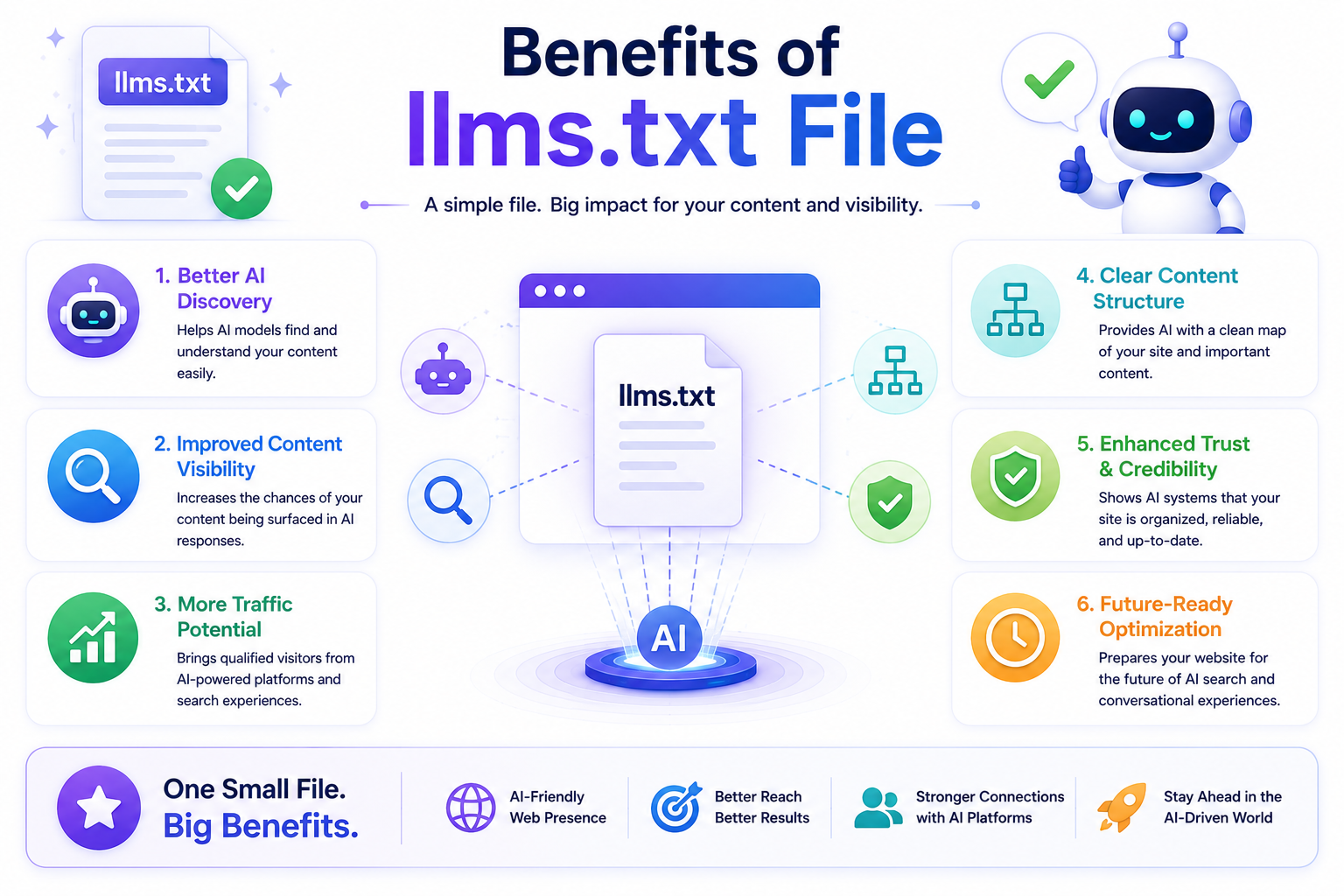
Benefits of llms.txt File
Using an llms.txt file offers several important SEO and AI advantages for modern websites. It helps large language models better understand your content structure, which improves how your site is interpreted in AI-driven search systems. This leads to stronger visibility and more accurate content representation.
Better AI Indexing
An llms.txt file helps AI systems quickly identify important pages on your website. This improves indexing accuracy and ensures key content is not ignored.
Improved Content Structure
It organizes your website information in a structured way, making it easier for AI models to understand relationships between pages and topics.
Higher Visibility in AI Search
With better structure and clarity, your website gains improved visibility in AI-powered search engines and LLM-based platforms.
Faster Content Understanding
AI systems can process your website content more quickly when guided by an llms.txt file, improving overall performance and relevance.
Stronger Semantic SEO
It enhances semantic SEO by helping AI understand context, meaning, and intent behind your content, not just keywords.
Benefits of Using llms.txt File
Benefit | Description | Impact on SEO |
Better AI Indexing | Helps AI understand site structure | High |
Improved Content Clarity | Organizes important pages clearly | Medium |
Faster AI Understanding | Reduces processing time for LLMs | High |
Higher Visibility | Improves AI search relevance | High |
Stronger Semantic SEO | Enhances meaning-based ranking signals | High |
Common Mistakes to Avoid
Many users make mistakes while creating an llms.txt file, which can reduce its effectiveness for AI indexing and SEO performance. Keeping the structure clean and properly formatted is important for ensuring that large language models can read and understand your website without confusion.
Adding Too Many URLs
Including too many URLs in your llms.txt file can make it cluttered and harder for AI systems to prioritize important pages. It is better to focus only on key sections of your website.
Using Incorrect Formatting
Incorrect formatting can break the structure of your file and lead to poor AI understanding. Always follow a clean, simple format so LLM systems can easily interpret the content.
Not Updating File Regularly
An outdated llms.txt file may not reflect your current website structure. Regular updates ensure that AI systems always access accurate and relevant information.
Placing File in Wrong Directory
If the file is not placed in the root directory, AI crawlers may not find it. Proper placement is essential for ensuring full AI SEO compatibility and visibility.
Future of llms.txt in AI SEO
The future of llms.txt files is closely tied to the rapid evolution of AI-powered search systems. As artificial intelligence becomes more advanced and widely used, structured files like llms.txt will play a bigger role in helping websites communicate clearly with large language models. This will improve how content is understood, ranked, and displayed in AI-driven results.
Websites that adopt llms.txt early will likely gain a competitive advantage in AI-powered search engines and LLM-based ranking systems. Early adoption helps improve content visibility, strengthens AI indexing signals, and ensures better long-term SEO performance as search technology continues to shift toward intelligent, context-aware systems.
CONCLUSION
Learning how to create an llms.txt file online is becoming an important part of modern SEO as search engines and AI systems continue to evolve. This file helps websites communicate clearly with large language models, making it easier for AI tools to understand structure, prioritize content, and improve indexing accuracy. Whether you are using WordPress, online generators, or platforms like llmprogen.com, the process is now simple, fast, and accessible even for beginners.
As AI-driven search continues to grow, tools like llms-full.txt, validators, and structured directories will become even more important for long-term visibility. Websites that adopt these systems early will have a stronger advantage in AI-based rankings, better content recognition, and improved discoverability across emerging search platforms. In the future, structured AI files will play a key role in how content is ranked, understood, and delivered to users worldwide.
FAQs
1. How to create llms txt file online?
You can use online generators or tools like llmprogen.com to create it automatically.
2. How to create llms txt file in WordPress?
Create a text file in your hosting file manager and upload it to your root directory.
3. What is llms txt validator?
It is a tool that checks errors in your llms.txt file structure.
4. What is llms-full.txt?
It is an extended version of llms.txt with more detailed AI instructions.
5. How to use llms-txt?
Place it in your website root directory for AI systems to read.
6. What is llms-txt directory?
It is the root folder where llms.txt is stored on your website.
7. Is llms txt used?
Yes, it is increasingly used in AI SEO and structured data optimization.
8. What is Mintlify llms txt?
It is a developer documentation system that structures AI-readable content.
Written by