Apple Business Manager Login: The Complete 2026 Guide (Now Apple Business)

To complete your Apple Business Manager login, go to business.apple.com and sign in with your Managed Apple Account. Then enter the verification code Apple sends you. Since April 14, 2026, the portal is called Apple Business, and it's free.
Stuck on an error? Keep reading. I'll show you the fix.
What Is Apple Business Manager Login, and Why Did It Change?
Here's what happened. On April 14, 2026, Apple merged Business Manager, Business Essentials and Business Connect into one platform called Apple Business. The web address didn't change, so your bookmark still works.
Same door, new house.
You'll still see terms like Managed Apple Account, MDM (mobile device management), and device enrollment. I'll explain each as we go.
Apple Business Manager vs. Apple Business: What Changed?
Feature | Old Apple Business Manager | Apple Business (since Apr 14, 2026) |
|---|---|---|
Login URL | business.apple.com | business.apple.com (same) |
Price | Free | Free |
MDM included | No (paid Business Essentials, US only) | Yes, included |
Maps and brand tools | Separate (Business Connect) | Included in one dashboard |
Availability | Global | 200+ countries and regions |
Honestly, that's a huge upgrade for zero dollars.
How to Log In to Apple Business Manager Step by Step
This takes about two minutes if your account already exists. Here's the checklist:
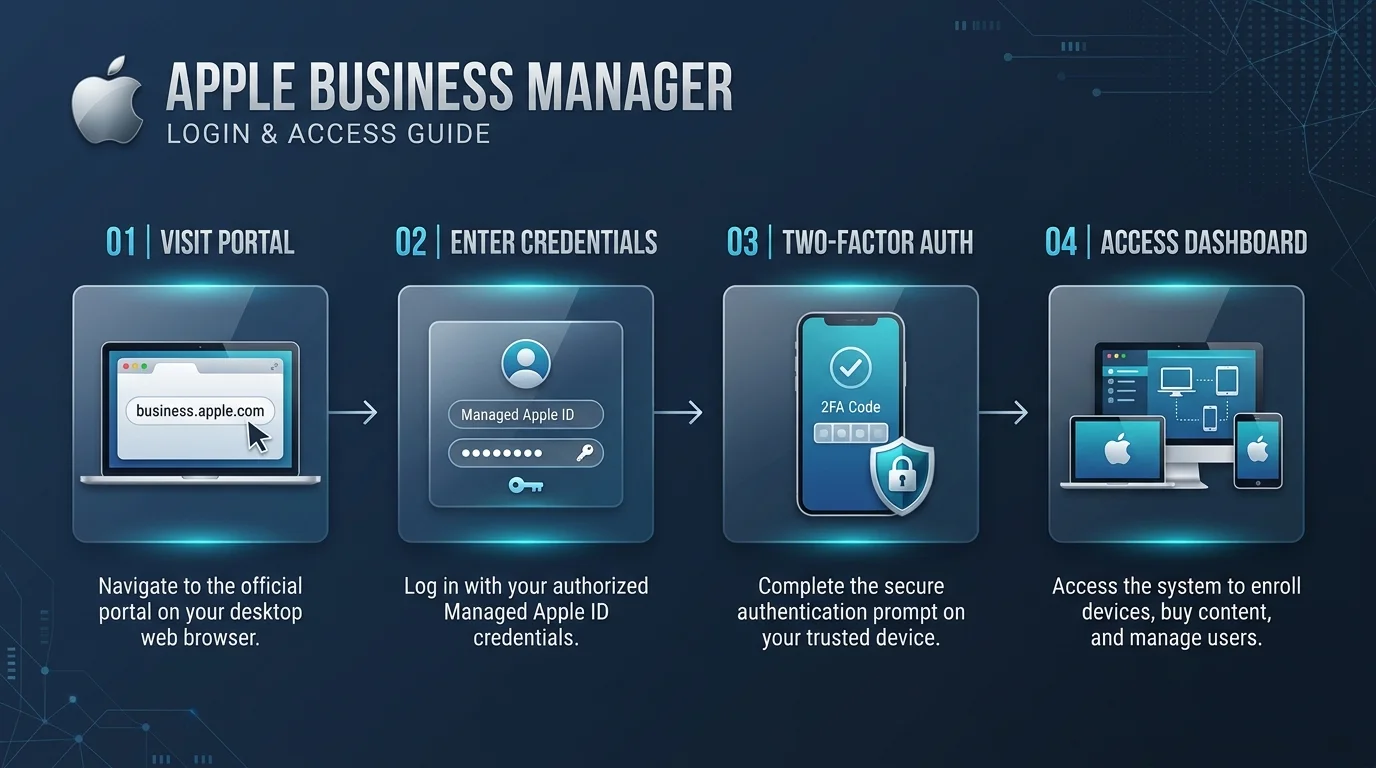
Open business.apple.com. Type it yourself, because phishing pages love this search term.
Enter your Managed Apple Account. A personal Apple Account won't work.
Enter the verification code. Apple's guide says admins and managers need a six digit code along with their password. That's 2FA (two factor authentication) at work.
Accept any new terms and conditions. Only an administrator can do this.
Land on your dashboard and add a backup admin right away.
Starting From Scratch? Enroll Your Organization
No account yet? Follow Apple's sign up walkthrough. Then verify within 60 days, or Apple deletes your organization, data and accounts.
Verification needs two methods, such as a DUNS number, a business license, or a DNS TXT record for domain verification. It can take up to five business days.
Already Using Apple Business Manager? Read This First
Here's something most guides skip. Apple's documentation says that the first time you sign in to Apple Business with an Apple Business Manager account, your organization migrates. After that, you can no longer sign in to the old Apple Business Manager.
It's a one way trip. One more thing: one analysis notes that Apple published no dedicated migration guide for Business Manager accounts. So back up your MDM tokens and settings before you click.
Apple Business Manager Login Not Working? Fix It Fast
You typed the right password. Nothing happens. Frustrating, I know.
Almost every case falls into one of three buckets: the wrong account type, a lockout, or a missing admin. Here's the quick reference table:
Problem | Likely cause | Fix |
|---|---|---|
"This Apple Account can't be used with Apple Business Manager" | You used a personal account | Sign in with your Managed Apple Account |
Account locked | More than 10 wrong passwords, or suspected fraud | An admin resets it. Fraud locks need Apple support |
Can't accept new terms | Only admins can accept them | Ask an existing administrator |
"Device can only be used with Apple Accounts from your organization" | Your IT team restricted personal accounts | Use your work account |
Original admin left | No backup admin exists | Contact Apple Business support |
Prevent the Lockout Nightmare
Apple recommends you add at least one extra administrator in case the original one can't sign in. Do it today.
Seriously, it takes one minute. Recovering from a lockout without a backup admin can take far longer.
Roles, Federated Authentication and Security
Logging in is only half the story. What you can do afterward depends on your role, and how you sign in depends on your identity provider (IdP) setup.
Roles and Permissions
Apple Business uses default roles like Organization Administrator, IT Administrator and Staff. You can also create up to 15 custom roles. Only 10 users can hold the Organization Administrator role. So give people the least access they need.
Federated Authentication
Want employees to sign in with credentials they already have? That's federated authentication. You can link to Google Workspace, Microsoft Entra ID or another IdP, though only one at a time. It supports single sign on and directory sync.
One gotcha: admins who manage federation can't sign in through it. Keep a separate manual admin account.
Does your team also run on Microsoft? Then our Office 365 login guide walks through the same sign in habits on the Microsoft side.
Connect Your MDM
Once you're in, you can generate a server token and upload it to your MDM, such as Jamf, Intune or Mosyle. That powers Automated Device Enrollment and zero touch deployment. Your devices set themselves up. Magic.
Keep Your Devices Secure
Strong sign in is only one layer. If you're weighing how Apple's approach stacks up against the competition, read our breakdown of Android vs iOS security before you roll out devices at scale.
Should You Sign Up for Apple Business?
Short answer? Yes.
You get device enrollment, volume purchasing for apps, Managed Apple Accounts, an included MDM and Maps brand tools, all at no cost. Compare that with paying per device for third party tools just to get started.
Managing even five iPhones, Macs or iPads? Skipping this leaves money and time on the table. Schools should look at Apple School Manager, which works the same way.
Apple Business Manager Login: Frequently Asked Questions
What is the Apple Business Manager login URL?
It's business.apple.com. That's the same address Apple Business uses now, so no change is needed.
Is Apple Business Manager still available in 2026?
Not under that name. On April 14, 2026, Apple replaced it with Apple Business. Everything Business Manager did is still included.
Is Apple Business Manager free?
Yes. Apple Business is free for new and existing users, including the MDM.
Why can't I log in with my personal Apple Account?
The portal requires a Managed Apple Account issued by your organization. Personal accounts trigger the "can't be used" error.
What if the only administrator left my company?
Contact Apple support. Next time, add a second administrator from day one.
Final Thoughts
Your Apple Business Manager login isn't scary once you know the flow. Use business.apple.com, sign in with your managed account, enter your code, and add a backup admin.
So head to business.apple.com right now. Sign in or enroll, and then set up that second admin before lunch.
Written by
Alex
Creative blogger sharing insights, stories, and fresh ideas.