What is a subnet? A subnet (short for subnetwork) is a smaller network carved out of a larger IP network. A subnet mask or CIDR prefix splits every IP address into a network part and a host part. Subnetting gives you better network security, less congestion, and easier network management.
Let me be straight with you. The first time someone said "subnet," I nodded like I understood.
I didn't.
Then I picked the wrong range for an office network, and half the printers vanished. That was my crash course.
So here's my promise: by the end of this guide, you'll know exactly how subnetting works, and you'll be able to split a network yourself in about five minutes.
What Is a Subnet?
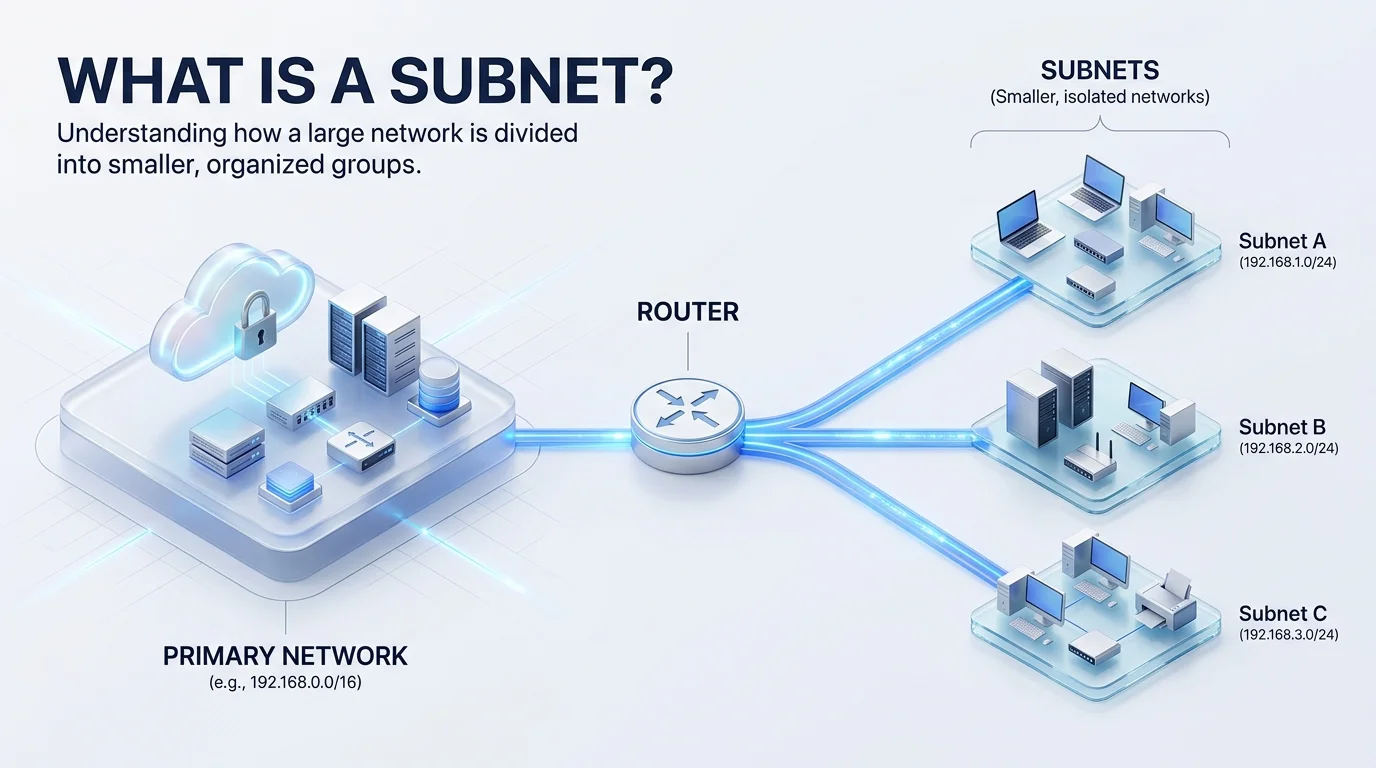
A subnet is a logical slice of a bigger network. The idea is old, and RFC 950 defines subnets as logically visible parts of a single Internet network. Organizations split one network into several instead of requesting a pile of separate network numbers.
Picture an apartment building. The building is your IP network, and each floor is a subnet.
Neighbors on one floor chat easily. To reach another floor, they go through the lobby, and in networking that lobby is your router.
Here's the key part. Every IP address has two halves: the network prefix and the host identifier. The prefix tells you which subnet you're on, and the host part tells you which device you are.
Subnet vs. VLAN vs. VPC
People mix these up constantly, so let me clear it up. Each one operates at a different layer, and each solves a different problem. A subnet is a Layer 3 (IP) concept, while a VLAN works at Layer 2. The FedRAMP subnets white paper states plainly that subnets are distinct from VLANs, security groups and virtual private clouds.
Feature | Subnet | VLAN | VPC |
|---|---|---|---|
OSI layer | Layer 3 (IP addressing) | Layer 2 (switching) | Cloud network container |
What it does | Splits an IP range into smaller ranges | Segments a LAN at the switch level | Isolates your private cloud network |
Defined by | Subnet mask or CIDR prefix | VLAN ID tag | CIDR block plus subnets |
Typical use | Organizing devices and routing | Separating departments on switches | Hosting cloud workloads |
Why Does Subnetting Matter?
Why bother splitting a network at all? Because one giant flat network gets messy fast. Every device hears every broadcast, and one misconfigured machine can annoy everybody.
Subnetting fixes that. It keeps traffic local, shrinks your broadcast domain, and gives you a clean place to apply firewall rules. It also makes addressing predictable. Servers, printers and routers usually need a static IP, and a well planned subnet gives each of them a fixed, documented home.
Security teams care too. NIST SP 800-171 control 3.13.5 calls for subnetworks for publicly accessible system components that are separated from internal networks, as summarized in this control reference. One note on scope: subnets segment traffic inside your network. If you're protecting traffic between networks, you'll want to understand proxy vs VPN as well.
Here's what you actually get:
Better performance, because broadcasts stay inside smaller segments
Tighter security, because you can isolate guest WiFi from payroll servers
Faster troubleshooting, because problems stay contained
Smarter growth, because you can add subnets without redesigning everything
Efficient use of address space, because you stop wasting big blocks on tiny teams
How Does Subnetting Work?
Subnetting works by borrowing bits from the host portion of an address and turning them into extra network bits. That's the whole trick. Two tools do the heavy lifting, the subnet mask and CIDR notation, and once you understand both, the rest is just arithmetic. Let me walk you through each one in plain English, with no scary binary lectures.
The Subnet Mask
A subnet mask is a 32 bit pattern that marks where the network part ends. Ones mean network, and zeros mean host.
Take 255.255.255.0. Your device compares a destination address against its own mask to decide: local delivery, or send it to the router? Flackbox's subnet mask tutorial shows this with a real laptop example.
One rule to remember: a valid mask is always a solid block of ones followed by a solid block of zeros. No mixing, ever.
CIDR Notation
CIDR notation is the shortcut. It writes the mask as a slash plus the count of one bits, so 255.255.255.0 becomes /24.
That means 192.168.1.0/24 has 24 network bits and 8 host bits. RFC 4632 defines this Classless Inter Domain Routing system. It replaced the old rigid class A, B and C scheme, which was blowing up the global routing table back in the early 1990s.
Want to know how many hosts fit? The formula is simple. Total addresses equal 2 to the power of your host bits, and usable hosts equal that minus 2. One address is the network address and one is the broadcast address, as ITU Online explains.
Subnet Cheat Sheet (IPv4)
Bookmark this table. It saves me time every single week, and the numbers follow the same logic as RFC 1878, the classic variable length subnet reference.
CIDR prefix | Subnet mask | Total addresses | Usable hosts |
|---|---|---|---|
/24 | 255.255.255.0 | 256 | 254 |
/25 | 255.255.255.128 | 128 | 126 |
/26 | 255.255.255.192 | 64 | 62 |
/27 | 255.255.255.224 | 32 | 30 |
/28 | 255.255.255.240 | 16 | 14 |
/29 | 255.255.255.248 | 8 | 6 |
/30 | 255.255.255.252 | 4 | 2 |
/31 | 255.255.255.254 | 2 | 2 (point to point links only) |
How to Subnet a Network, Step by Step
Now for the fun part. Follow these steps and you'll split a network without breaking anything. This walkthrough starts with a private range, because that's what most of you will use at home or in an office. Private ranges come from RFC 1918, which reserves 10.0.0.0/8, 172.16.0.0/12 and 192.168.0.0/16 for internal networks.
Say you own 192.168.10.0/24 and you need four subnets.
Count what you need. Four subnets means 2 extra bits, since 2² = 4.
Borrow the bits. Your /24 becomes a /26.
Convert the mask. /26 equals 255.255.255.192.
Find the block size. Subtract 192 from 256 and you get 64.
List the subnets. They start at .0, .64, .128 and .192.
Check the hosts. Each block holds 64 addresses, so 62 are usable.
Done. You just did IP subnetting.
When Subnets Need Different Sizes
Real offices aren't tidy. Your sales team has 50 people, while your server room has 6 machines. A one size fits all mask wastes a ton of addresses here.
That's where VLSM, or variable length subnet mask, saves you. TechTarget explains that each subnet picks the block size it actually needs. Sales gets a /26, servers get a /29, and nothing is wasted.
For router to router links, go even smaller. RFC 3021 allows a /31 on point to point links, so both addresses are usable hosts.
Subnetting vs. Supernetting
Supernetting is the reverse move. Instead of splitting one network into many, you combine several smaller networks into one larger block. ISPs use this to shrink routing tables through route aggregation, which is the core benefit behind CIDR.
Subnets in the Cloud and in IPv6
You might assume subnets faded away once everything moved to the cloud. Nope. They matter more than ever. Every major cloud provider builds on them, and the rules differ slightly from your office LAN. I'll cover AWS and Azure first, then IPv6, where the habits you learned in IPv4 can actually backfire.
AWS and Azure Subnets
In AWS, a subnet is a range of IP addresses in your VPC, and you launch resources like EC2 instances inside it. A subnet's type depends on how you configure routing.
Feature | Public subnet | Private subnet |
|---|---|---|
Route to internet gateway | Yes | No |
Direct internet access | Possible | Not directly |
Best for | Load balancers, bastion hosts | Databases, app servers |
Security posture | More exposed | Recommended by AWS for protection |
AWS reserves five IP addresses in every subnet, so factor that into your sizing. Subnet sizes run from /16 down to /28, according to this AWS networking summary.
Azure works the same way in spirit. Per Microsoft's documentation, every resource in a virtual network lives inside a subnet.
IPv6 Subnetting
IPv6 is a different game. The standard subnet for hosts is a /64, and RFC 7421 explains why that boundary exists. It keeps SLAAC (stateless address autoconfiguration) working.
A single /64 holds 2^64 addresses, which is roughly 18.4 quintillion. So don't squeeze IPv6 subnets the way you would in IPv4. You'll break things, and you won't save anything.
Common Subnetting Mistakes to Avoid
I've made every one of these. Learn from my pain.
Overlapping Ranges
Two subnets that share addresses will break routing. Always check that every range is unique before you deploy. Cloud platforms enforce this, and AWS requires CIDR blocks inside one VPC not to overlap.
Picking a Mask That's Too Small
It's tempting to be stingy. Then you add 20 devices and run out of room. Plan for growth, and leave breathing space.
Forgetting Reserved Addresses
Network, broadcast and cloud reserved addresses aren't usable by your devices. Count them in, or your math will be off.
FAQ: Subnet Questions Answered
What is a subnet in simple terms?
A subnet is a smaller network created from a larger one. It groups devices together so traffic stays local, security rules are easier to apply, and the network is easier to manage. A subnet mask or CIDR prefix defines its boundaries.
Is 255.255.255.0 a subnet?
No, it's a subnet mask, not a subnet. The mask equals a /24 prefix and tells devices which part of an address is the network. The subnet is the actual range of addresses, like 192.168.1.0/24.
How many hosts can a /24 subnet hold?
A /24 has 256 total addresses and 254 usable hosts. One address is reserved as the network address and one as the broadcast address. In some cloud platforms, extra addresses are reserved too.
What is the difference between a subnet and a VLAN?
A subnet divides networks at Layer 3 using IP addresses. A VLAN divides networks at Layer 2 using switch level tags. They're often paired, with one VLAN mapped to one subnet.
Why is IPv6 subnetting always /64?
IPv6 host subnets use a /64 because interface identifiers are 64 bits long. That length supports SLAAC, which lets devices configure their own addresses. Longer prefixes on host networks can break that automation.
Stop Guessing. Start Planning.
Look, you can keep eyeballing ranges and hoping nothing overlaps. Plenty of people do.
Then they lose a weekend to routing conflicts.
Or you can plan your address space properly, right now. [Your Product Name] gives you a visual subnet planner, instant CIDR and VLSM calculations, and conflict checking before anything goes live. It handles the math, so you don't have to.
I use this kind of tooling on every project, and I'd never go back. Try [Your Product Name] today, map your first network in minutes, and ship with confidence.
Want to keep learning? Read our guides on what a static IP is and proxy vs VPN.
Written by