Proxy vs VPN: Key Differences Explained (2026)


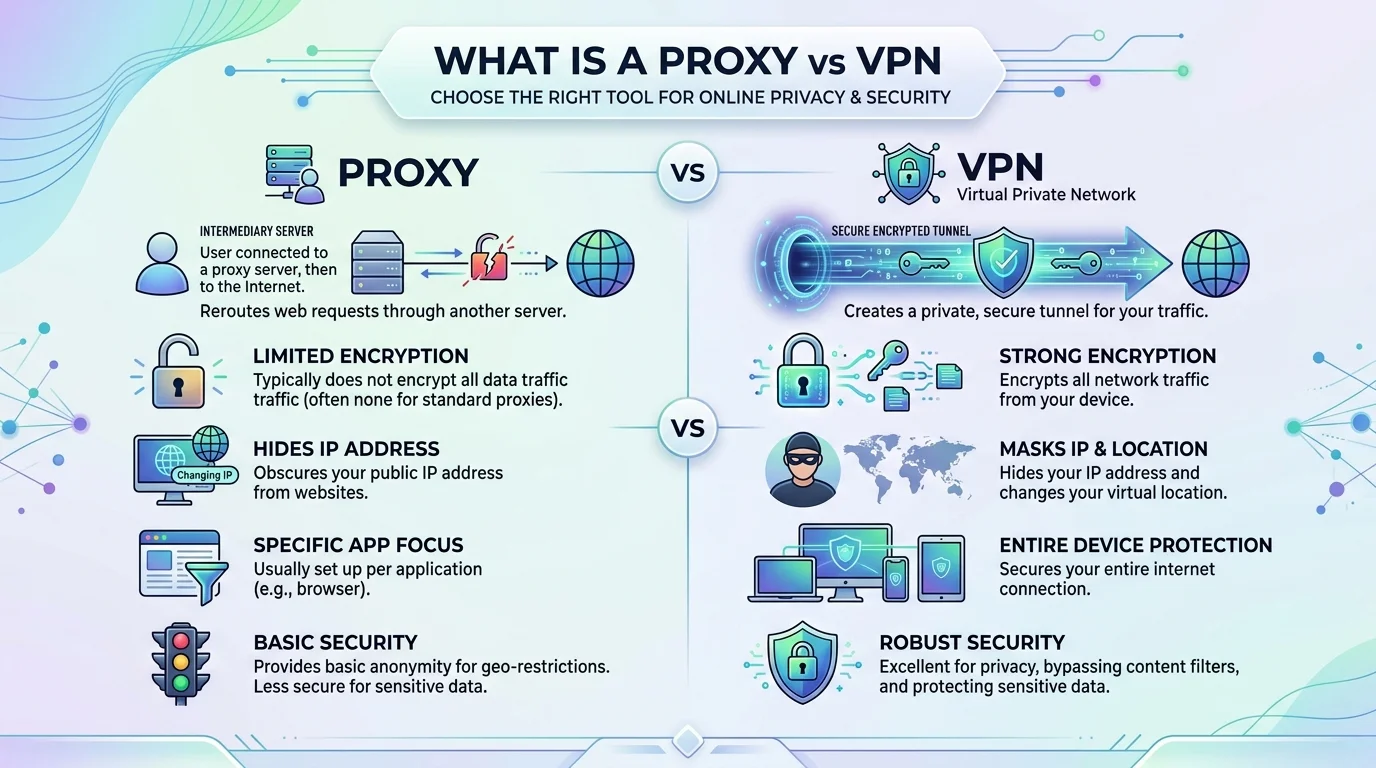
Proxy vs VPN: A proxy reroutes your IP address through a different server without encrypting your traffic. A VPN does the same IP rerouting, but it also encrypts your entire connection so nobody on the network can read your data. That's the core difference — everything else in this guide builds on that one distinction.
So you've heard both terms thrown around like they're the same thing.
They're not.
I'm going to break this down for you the simple way — no jargon, no fluff, just what you actually need to know before you pick one.
Let's get into it.
What Is a Proxy Server?
A proxy server is basically a middleman between your device and the internet.
Here's the deal: when you connect through a proxy server, your traffic gets routed through a different IP address before it reaches its destination. Websites see the proxy's IP, not yours.
That's it. That's the core function.
But here's what most people don't realize — a proxy doesn't encrypt your traffic. It just reroutes it.
Why People Use Proxies
You'll typically see proxies used for:
Bypassing geo-restrictions on specific websites
Web scraping and automation
Basic IP masking for casual browsing
Accessing content blocked on a school or office network
Sounds useful, right? It is — for specific, low-stakes tasks.
But if you're thinking about privacy or data security, a proxy alone isn't going to cut it.
What Is a VPN?
Now let's talk about VPNs.
A Virtual Private Network (VPN) does everything a proxy does — and then adds a serious layer of protection on top.
When you connect to a VPN service, your entire internet connection gets encrypted through a secure tunnel. Not just one app. Not just your browser. Everything.
This matters more than you'd think.
Why Encryption Changes the Game
Think about it this way:
A proxy hides your location.
A VPN hides your location and scrambles your data so nobody — not your ISP, not hackers on public Wi-Fi, not anyone snooping on the network — can read what you're sending or receiving.
Public Wi-Fi is where this really matters. According to the Federal Trade Commission, unsecured public networks make it easier for attackers on the same network to intercept unencrypted traffic. That risk applies whether you're at a coffee shop, airport, or hotel — anywhere you don't control the network.
If you're curious how this compares across devices, our breakdown of Android vs iOS security covers how built-in protections differ by platform, which matters when you're deciding how much a VPN needs to compensate for.
Proxy vs VPN vs Tor: Where Each One Fits
You've probably also heard of Tor, so let's place it on the map since it often gets lumped into this conversation.
Tor routes your traffic through multiple volunteer-run relays, encrypting it in layers along the way. It's built for anonymity, not speed — and it's noticeably slower than a proxy or VPN because of all that relay-hopping.
Here's the simplest way to think about the three:
Proxy — reroutes traffic, no encryption, fast, low protection
VPN — reroutes traffic, encrypts everything, moderate speed, strong protection
Tor — reroutes traffic through multiple layers, heavily encrypted, slow, maximum anonymity
Most people don't need Tor's level of anonymity for everyday browsing. A VPN covers the vast majority of real-world privacy and security needs without the speed tradeoff.
Proxy vs VPN: The Key Differences
Let's make this dead simple with a quick breakdown.
Feature | Proxy | VPN |
|---|---|---|
Hides IP address | ✅ | ✅ |
Encrypts traffic | ❌ | ✅ |
Covers entire device | ❌ (usually app-specific) | ✅ |
Protects on public Wi-Fi | ❌ | ✅ |
Speed | Often faster | Slightly slower (due to encryption) |
Best for | Quick, low-risk tasks | Privacy, security, sensitive data |
See the pattern?
A proxy is a quick fix. A VPN is a full solution.
Step-by-Step: How to Decide Which One You Need
I know decision fatigue is real, so let's simplify this into steps.
Step 1: Ask Yourself What You're Actually Doing Online
If you're just trying to view a blocked webpage or automate a simple task, a proxy might genuinely be enough.
But if you're handling anything sensitive — banking, passwords, private messages — you need real encryption.
Step 2: Check Where You're Connecting From
Using public Wi-Fi at a coffee shop, airport, or hotel?
That network is a playground for attackers. A proxy won't protect you there. A VPN will.
Step 3: Consider What You're Protecting
Are you protecting a single browser tab? Or your entire digital footprint?
This alone usually answers the question for most people.
Step 4: Test Before You Commit
Before committing to any VPN provider, look for:
A clear no-logs policy
Strong encryption standards (AES-256 is the industry benchmark used by the National Institute of Standards and Technology)
A kill switch feature
Servers in the regions you actually need
Don't skip this step. Not all VPNs are built the same.
Common Mistakes People Make
Let's talk about where people go wrong, because I see this constantly.
Mistake #1: Assuming a free proxy is "safe enough."
Free proxies often log your data — sometimes selling it. If it's free, you're often the product.
Mistake #2: Thinking a VPN makes you completely anonymous.
It doesn't. A VPN protects your traffic and IP, but it doesn't erase browser fingerprinting, cookies, or account-based tracking. It also won't stop something like a keylogger already running on your device — that's a local threat a VPN was never designed to catch.
Mistake #3: Ignoring speed and server load.
A cheap or overloaded VPN can tank your connection speed. Test before you buy.
Which One Should You Actually Use?
Honestly? For most people reading this, a VPN is the smarter long-term choice.
Here's why:
You get IP masking and full-traffic encryption
You're protected on any network, not just specific apps
You get consistent cybersecurity benefits across every device you use
A proxy still has its place — quick, specific, low-risk use cases. But if you care about your online privacy, your data, and staying protected on the networks you use every day, a properly vetted VPN is the tool built for that job.
If you're comparing providers, prioritize ones with independently audited no-logs policies, strong encryption, and transparent pricing. That combination is what actually protects you, not marketing claims.
FAQ
Is a VPN illegal?
No, VPNs are legal in most countries, including the US, UK, and across the EU. A small number of countries restrict or ban VPN use, so check local regulations if you're traveling.
Do I need both a VPN and a proxy?
Rarely. A VPN already covers what a proxy does, plus encryption. Some advanced users layer a proxy on top of a VPN for specific tasks like scraping, but for everyday use, one or the other is enough.
Is a VPN better than a proxy for gaming?
It depends on what you need. A proxy can reduce latency for specific game servers, but a VPN offers better protection against DDoS attacks and works across your whole connection, not just one app.
Can my ISP see what I'm doing if I use a VPN?
Your ISP can see that you're connected to a VPN server, but not the content of your encrypted traffic or the sites you visit within that tunnel.
Does a VPN slow down my internet speed?
Slightly, due to the encryption overhead. A good VPN provider with a large, well-maintained server network keeps this slowdown minimal.
Is a free VPN safe to use?
Generally, no. Free VPNs often monetize through data logging or ad injection. If privacy is the goal, a paid provider with an audited no-logs policy is the safer bet.
Final Thoughts
Proxies and VPNs solve different problems.
A proxy reroutes. A VPN reroutes and protects.
Once you know what you're actually trying to accomplish — quick access vs. real security — the right choice becomes obvious.
Pick based on your actual risk, not just convenience. Your data will thank you.
Written by
Alex
Creative blogger sharing insights, stories, and fresh ideas.