What Is a Static IP? Meaning, Uses & Guide 2026)


A static IP address is an IP address that never changes. It stays the same every time your device or router reconnects. By contrast, a dynamic IP is assigned automatically by DHCP and can change over time. Static IPs are ideal for hosting websites, remote access, and IP whitelisting, but most home users don't need one.
Here's the deal:
Every device on the internet has an address.
Most of the time, that address changes quietly in the background. You never notice.
Until you try to host a website, set up remote desktop access, or check your security camera from outside your house. Then a changing address becomes a real headache.
In this guide, I'll show you exactly what a static IP is and how it compares to a dynamic one. I'll also walk you through how to get and set one up, step by step.
Key Takeaways:
A static IP stays the same, while a dynamic IP changes periodically.
Static IPs can be private (inside your network, free) or public (from your ISP, usually paid).
You need one for servers, remote access, and whitelisting, but not for everyday browsing.
IPv4 exhaustion is making public static IPs scarcer and pricier every year.
Let's dive right in.
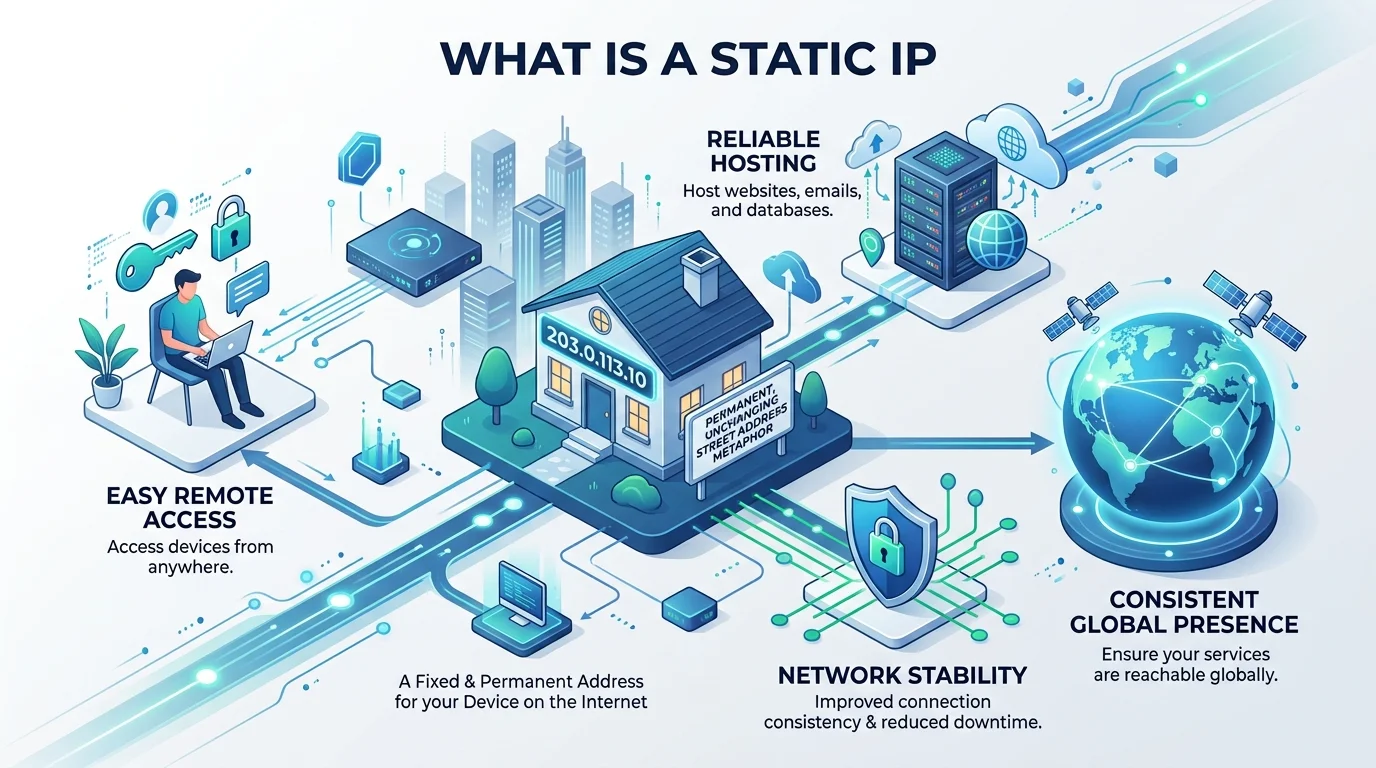
What Is a Static IP Address?
Let's start with the basics.
An IP address (short for Internet Protocol address) is a unique identifier for a device on a network. I like to think of it as a home address for your computer, because it tells data exactly where to go.
A static IP is simply an address that doesn't change. It stays the same after you restart your router, reboot your computer, or reconnect.
Fortinet describes it as a manually configured identifier that stays consistent across network sessions. You'll also hear it called a fixed IP address or permanent IP address, and it works with both IPv4 and IPv6.
Curious how a web address you type ends up pointing to an IP? My guide on what a URL is and how it works explains that journey.
Static IP vs. Dynamic IP: What's the Difference?
Most home users don't have a static IP at all.
Instead, your Internet Service Provider (ISP) hands you a dynamic IP address through DHCP (Dynamic Host Configuration Protocol). According to Red Hat, devices essentially lease an address from a DHCP server for a set time.
When that DHCP lease expires, your address can change.
Show Image
Here's a quick side by side comparison:
Feature | Static IP | Dynamic IP |
|---|---|---|
Does it change? | No | Yes, periodically |
Assigned by | Admin or ISP (manually) | DHCP server (automatically) |
Cost | Usually extra | Free |
Setup effort | Manual | Automatic |
Best for | Servers, remote access, whitelisting | Browsing, streaming, gaming |
How Static IPs Actually Get Assigned
Believe it or not, this is written into an official internet standard.
RFC 2131, the document that defines DHCP, lists three methods for handing out addresses: automatic allocation, dynamic allocation, and manual allocation. With manual allocation, an administrator chooses the address and DHCP simply delivers it.
In other words, you can get a fixed address in two ways:
Manual IP configuration directly on the device
A DHCP reservation on your router, which ties an address to your device's MAC address
Public vs. Private Static IPs
But wait, there's a catch.
Your device actually has two kinds of addresses. A private IP address works only inside your home or office network, while a public IP address is what the rest of the internet sees.
According to ARIN, the private ranges reserved by RFC 1918 are:
10.0.0.0 to 10.255.255.255
172.16.0.0 to 172.31.255.255
192.168.0.0 to 192.168.255.255
Your router translates between the two using NAT (Network Address Translation).
So a static private IP is free, but a static public IP comes from your ISP.
Do You Need a Static IP?
Here's the honest truth: not everyone does.
I've found the easiest way to decide is to look at what you actually do online. If other people, apps, or devices need to reliably find you, then a static IP makes sense. If you mainly consume content, a dynamic IP works just fine.
You probably need a static IP if you:
Host a website, email server, or FTP server
Use remote desktop or run your own VPN server
Log in to remote servers over SSH (new to this? Read my guide on what an SSH key is and how it works)
Need IP whitelisting for business apps or firewalls
Run a game server or access IP cameras remotely
You probably don't need one if you:
Mostly browse, stream, and use social media
Never access your home devices from outside
Benefits (and Downsides) of a Static IP
So, why bother?
With a dynamic address, you're basically moving house every few days without telling anyone. With a static one, you give out your address once, and it just works. That consistency is the whole point, and it unlocks some big advantages for you.
Reliable web hosting. Point your DNS records straight at your server.
Easy remote access. Remote tools connect every single time.
Smoother port forwarding. Services stay reachable from outside your network.
Fewer offline printers. A network printer whose IP keeps changing often shows up as offline. If that sounds familiar, here's how to fix a printer that says it's offline.
Better geolocation accuracy. Fortinet notes that dynamic IPs are less effective for hosting and geolocation.
The Downsides
To be fair, there are trade offs.
First, it usually costs extra. Cables and Kits points out that ISPs typically charge a surcharge per static address.
Second, a fixed address is easier to target over time, so good network security matters. Thankfully, a solid firewall and regular updates handle most of that risk.
Is a Static IP Faster?
Short answer: no.
A static IP doesn't boost your internet speed. Your bandwidth depends on your plan, not on whether your address changes. What a static IP improves is reliability for incoming connections.
Why Static IPs Are Getting Harder to Find
Here's something most guides skip.
IPv4 only supports roughly 4.3 billion addresses, and that's nowhere near enough for today's internet. ARIN confirms its free pool ran dry on September 24, 2015, after the global IANA pool was depleted in 2011.
As a result, many ISPs now use carrier grade NAT (CGNAT). As Wikipedia explains, it shares a small pool of public addresses across many customers.
Cloud providers feel it too. Since February 2024, AWS has charged for every public IPv4 address, including Elastic IPs, at $0.005 per hour.
What about IPv6? Its 128 bit design offers vastly more addresses, so scarcity isn't an issue there. But IPv4 still dominates for now.
How to Check If Your IP Is Static
Before you change anything, check what you already have.
It only takes a minute. Your operating system shows whether your address is assigned automatically or manually. Just keep in mind this tells you about your private IP. To know whether your public IP is static, you'll need to check your ISP plan or ask them directly.
Windows 11: Go to Settings > Network & internet and look at IP assignment. "Automatic (DHCP)" means dynamic, and "Manual" means static.
macOS: Check Configure IPv4. NordVPN notes that "Manually" means static and "Using DHCP" means dynamic.
How to Get a Static IP: Step by Step Guide
Ready to set one up?
Good news: it's simpler than it sounds. I'll break it into clear steps, starting with a quick CGNAT check. Then you'll request an address from your provider and configure your device or router. Just follow along, and you'll have a working static IP in no time.
Step 1: Check Whether You're Behind CGNAT
Log in to your router's admin panel and find the WAN IP address.
If it falls between 100.64.x.x and 100.127.x.x, you're behind CGNAT, and port forwarding won't work without a real public IP.
Step 2: Request a Static IP From Your ISP
Next, contact your ISP.
Ask for a static public IP add on. Many providers include it with business internet plans, while some offer it to home users for a monthly fee.
Running cloud servers? Grab an Elastic IP or its equivalent from your cloud provider instead.
Step 3: Configure the Static IP
Finally, enter the details your ISP gives you.
You'll need four things: the IP address, subnet mask, default gateway, and DNS server. Double check each one, because a single typo can knock you offline.
Option A: Set a Static IP in Windows 11
Windows makes this straightforward.
Microsoft's TCP/IP settings guide follows the same path. Here's the quick version:
Open Settings > Network & internet.
Select Ethernet or Wi-Fi, then your network.
Next to IP assignment, click Edit.
Switch Automatic (DHCP) to Manual.
Turn on IPv4 and enter your address, subnet, gateway, and DNS.
Click Save.
Show Image
Using an older version? NETGEAR's guide covers the Control Panel method.
Option B: Use a DHCP Reservation on Your Router
This is my favorite method for home networks.
Instead of editing every device, you tell your router to always give a device the same private address. It's cleaner, and it avoids IP conflicts. Menu names vary by router brand, but the process is similar:
Log in to your router's admin page.
Open the DHCP or LAN settings.
Find Address Reservation or Static Lease.
Select your device by its MAC address.
Assign an IP and save.
Show Image
Frequently Asked Questions
Does a static IP cost money?
Usually, yes. A static private IP is free, but ISPs typically charge extra for a static public IP.
Is a static IP the same as a public IP?
No. "Static" describes whether the address changes. "Public" describes whether it's visible to the internet. An address can be static and private, or dynamic and public.
Is a static IP less secure?
It can be slightly easier to target because it doesn't change. A good firewall and regular updates reduce that risk.
Can I get a static IP for home internet?
Often, yes. Many ISPs offer it as a paid add on, though some limit it to business plans.
Is a VPN dedicated IP the same as a static IP?
Close. A dedicated VPN IP is a static address from your VPN provider, and it's useful for whitelisting. It can't replace an ISP static IP for hosting servers at home, though. Not sure which tool fits your needs? See my breakdown of proxy vs VPN and the key differences.
Does a static IP make my internet faster?
No. Your speed depends on your plan. A static IP improves reliability, not bandwidth.
Is a Static IP Worth It?
So, should you buy one?
If you only browse, stream, and scroll, stick with your free dynamic IP. But if you host websites, run a home server, manage remote workers, or rely on IP based authentication, a static IP is one of the smartest upgrades you can make.
It saves you time. It prevents broken connections. And as IPv4 addresses keep getting scarcer, locking one in today just makes sense.
My advice? Call your ISP this week and ask about a static IP plan. You'll wonder how you ever managed without it.
Written by
Alex
Creative blogger sharing insights, stories, and fresh ideas.