What Is Power BI? The Complete 2026 Guide for Beginners


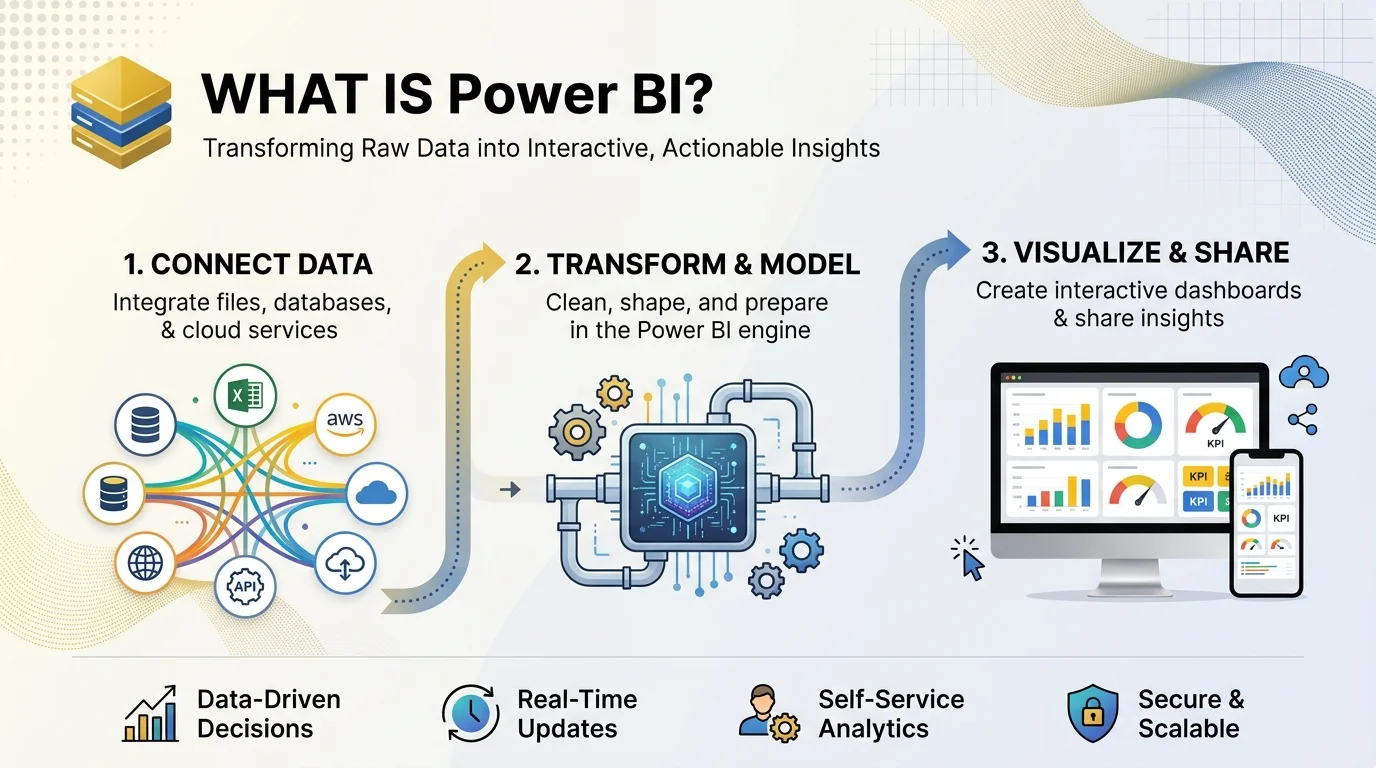
What Is Power BI: Power BI is Microsoft's business intelligence platform. It connects to your data sources, cleans and models the data, and turns it into interactive dashboards and reports you can share with your team. Power BI Desktop is free, and paid sharing starts at $14 per user per month.
What Is Power BI, Exactly?
Let me be straight with you. I used to dread spreadsheets. Then I opened my first Power BI dashboard, and I got it in about 30 seconds.
Power BI is a self service analytics tool. You don't need to be a data scientist. If you can use Excel, you're already halfway there.
Microsoft describes it as a collection of software services, apps, and connectors that turn unrelated data into interactive insights. My version? It shows you what matters in your numbers, fast.
A Quick History of Power BI
Power BI isn't some shiny new toy. Knowing where it came from explains why it feels so familiar if you've touched Excel.
It started as Project Crescent around 2010, built on Power Pivot and Power Query, and reached the public on July 24, 2015.
Microsoft has also been named a Leader in Gartner's Magic Quadrant for analytics and BI platforms for sixteen consecutive years, as of the 2023 report. I haven't verified newer Gartner placements, so check Gartner for the latest.
Today it sits inside Microsoft Fabric, which unifies Power BI, Azure Synapse, and Data Factory on one platform.
The Main Components of Power BI
Beginners get confused here, so I'll keep it simple. Power BI isn't one app. It's a small family of tools, and each has its own job.
Component | What It Does | Best For |
|---|---|---|
Power BI Desktop | Free Windows app for building reports and data models | Analysts and report builders |
Power BI Service | Cloud hub for publishing, sharing, collaborating | Teams and managers |
Power BI Mobile | iOS and Android apps for viewing reports | People on the go |
Power BI Report Server | On premises hosting | Companies that can't use the cloud |
Power BI Gateway | Secure bridge to on premises data | IT and data teams |
This breakdown follows RADACAD's component guide and Microsoft's Power BI service training.
Why You'll Love Power BI: Key Features
Features are nice, but what do you actually get? Speed, clarity, and confidence. You stop guessing and start knowing.
It Cleans Your Data for You
Power Query is a built in ETL tool. It lets you clean and reshape data from many sources, per Zero To Mastery. Messy column? Fixed. Duplicates? Gone. If you're still tidying data by hand, my guide on how to remove duplicates in Excel shows the manual way, and you'll see why Power Query feels like a cheat code.
It Calculates Like a Pro
DAX (Data Analysis Expressions) powers your measures and calculated columns. You can learn the basics in a weekend.
It Uses AI
Copilot in Power BI helps you build reports and write DAX from plain language prompts. According to Microsoft Learn, it requires a paid Fabric capacity of F2 or higher (or Premium P1 or higher). A trial won't work.
It Plugs Into Microsoft 365
Excel, SharePoint, Teams, and Azure connect without drama. Governance, row level security, and sharing come built in. And at FabCon 2026, Microsoft announced Fabric IQ, which brings governed Power BI insights into Microsoft Copilot Chat.
Power BI Use Cases: Who Actually Uses It?
You might wonder if this fits your job. It almost certainly does. I've seen the same pattern across teams, and it always starts with one painful weekly report.
Sales: track pipeline, quotas, and KPIs in one view.
Finance: monitor budgets, forecasts, and variances.
Retail: analyze sales and inventory trends.
Healthcare: visualize patient data and health trends.
Operations: watch on time delivery and real time dashboards.
How to Get Started: A Step by Step Guide
Time to build something. Don't worry, there's no heavy theory here. Follow these four steps and you'll have your first interactive report today.
Step 1: Download Power BI Desktop
It's free, so the risk is zero. Install it and open the blank canvas. Give yourself ten minutes.
Step 2: Connect Your Data
Click Get Data and choose a source, like an Excel workbook or SQL database.
Step 3: Clean It in Power Query
Remove blanks, fix data types, and rename columns. Microsoft's guided learning paths walk you through each move. Don't skip this step.
Step 4: Build Visuals and Publish
Drag fields onto the canvas to create charts, KPI cards, and slicers. Add relationships and a few DAX measures. Then hit Publish and share the link.
New to charts? Practice the basics first with my walkthrough on how to create charts in Excel. The same visual instincts carry straight over to Power BI.
Power BI Pricing: What Will It Cost You?
Is this going to wreck your budget? Nope. The entry point is free, and the paid tiers are modest.
Plan | Price (List) | Best For |
|---|---|---|
Power BI Desktop | Free | Building reports on your own machine |
Power BI Pro | $14 per user per month (paid yearly) | Sharing and collaboration |
Premium Per User (PPU) | $24 per user per month (paid yearly) | Advanced AI, larger models, paginated reports |
Fabric capacity | From about $262 per month (F2) | Whole organization licensing |
Pro and PPU prices took effect April 1, 2025 and were still current as of April 2026, per that source. Prices change, so confirm on Microsoft's official pricing page before you buy. (Verified from secondary sources, October 2026.)
One tip: the same source puts the break even between Pro and F64 capacity at roughly 150 to 200 viewers, though that varies by region.
Power BI vs. Tableau vs. Excel
You'll compare tools. Good. Here's my honest take, and the table keeps it quick.
Feature | Power BI | Tableau | Excel |
|---|---|---|---|
Starting cost | Free Desktop; Pro $14 | Paid | Part of Microsoft 365 |
Data modeling | Strong (Power Query and DAX) | Lighter | Basic to moderate |
Microsoft integration | Native | Limited | Native |
Learning curve | Gentle if you know Excel | Moderate | Easiest |
Best for | Dashboards and sharing | Visual exploration | Quick calculations |
The Microsoft community points to DAX, Power Query, and Microsoft integration as Power BI's edge. If your company lives in Microsoft land, the choice is almost obvious.
Power BI Limitations You Should Know
I won't pretend it's perfect. You deserve the full picture before you spend a cent.
DAX has a learning curve. Evaluation context trips up almost everyone.
Licensing is confusing. Copilot, PPU, and Fabric each have different rules.
Desktop is Windows only. Mac users need a workaround.
Capacity costs add up for very large teams.
Still, none of these are dealbreakers, and each is easy to plan around.
Power BI FAQs
What is Power BI used for?
It's used to connect, clean, model, and visualize data so teams can make faster decisions. Think dashboards, reports, and data analytics in one place.
Is Power BI free?
Power BI Desktop is free. You pay (Pro at $14 per user per month) when you want to share and collaborate in the cloud.
Is Power BI hard to learn?
Not if you know Excel. The basics take days. DAX takes longer, but you can build useful reports without it.
Do I need to know DAX?
No, not to start. Drag and drop visuals and Power Query cover most beginner needs.
Does Power BI include AI?
Yes. Copilot works in Desktop and the service, but it needs a paid Fabric capacity of F2 or higher.
Is Power BI better than Tableau?
For Microsoft based teams, usually yes, thanks to value and integration. Tableau remains strong for visual exploration.
My Final Verdict: Should You Buy Power BI?
Yes. If you want faster decisions and less Monday morning reporting pain, Power BI is the smartest move you can make this year. It's free to try, cheap to scale, and Microsoft keeps shipping, with a public release plan you can follow.
Here's what I'd do. Download Power BI Desktop today. Build one tiny dashboard this week. Then grab a Pro license and share it with your team.
Download Power BI Desktop free and start now.
Written by
Alex
Creative blogger sharing insights, stories, and fresh ideas.