Microsoft Office 365 Login: The Fast, Safe Way to Sign In (2026 Guide)

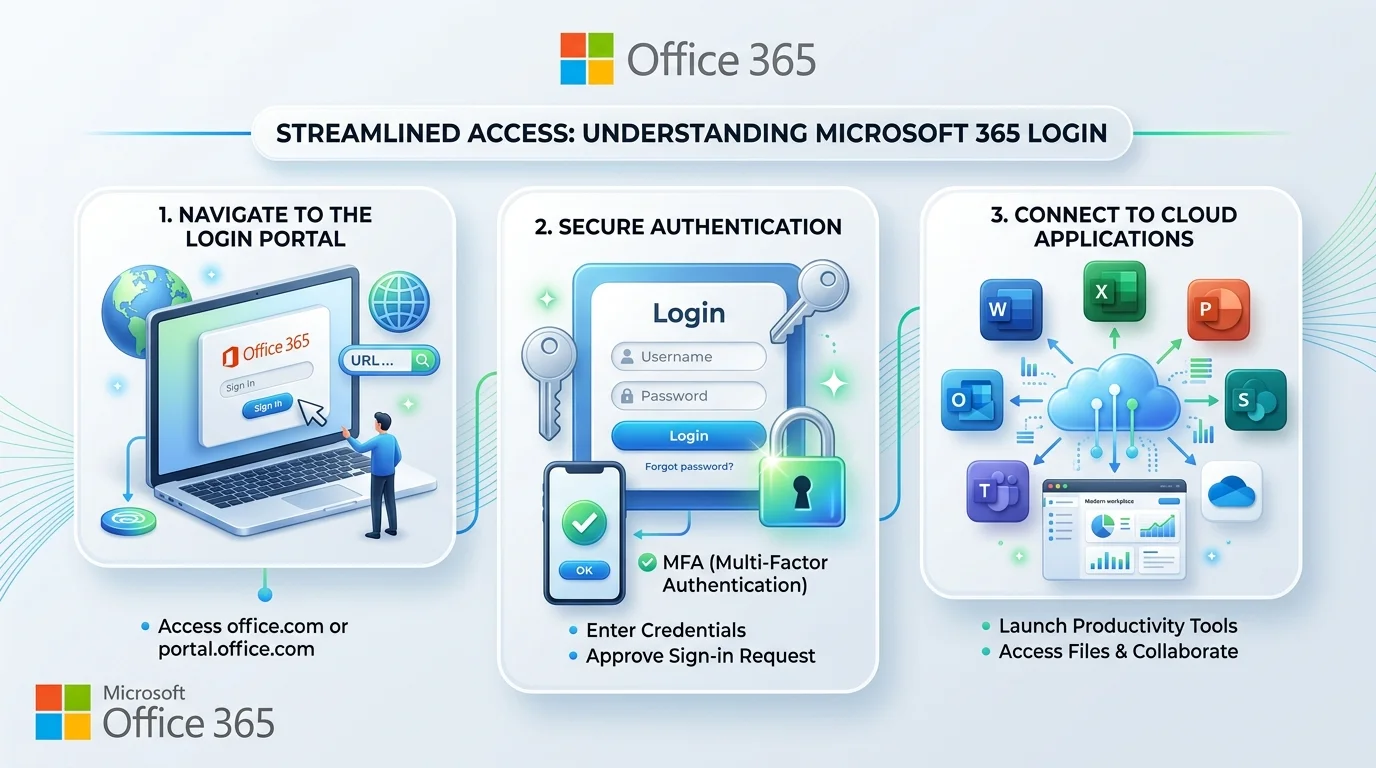
To Microsoft Office 365 login, go to office.com or microsoft365.com, click Sign in, and enter your Microsoft account or work/school email, then your password and multifactor authentication approval. Work accounts can also use portal.office.com. Admins sign in at admin.microsoft.com.
I've watched people burn twenty minutes on a simple sign-in. Don't be one of them.
This guide gives you the exact steps, the fixes, and a plan comparison to help you choose. Let's go.
What Is the Microsoft Office 365 Login (And Why Does It Confuse Everyone)?
Quick history first. Office 365 is now Microsoft 365, but people still search the old name every day.
There are two doors. One is for personal Microsoft accounts. The other is for work or school accounts. Use the wrong one and you'll hit confusing errors. This single distinction solves roughly half of all sign-in problems I see. Microsoft confirms you can sign in with either account type.
Which Login URL Should You Use?
Who you are | Where to sign in |
|---|---|
Personal user | account.microsoft.com or office.com |
Work or school user | office.com, microsoft365.com, or portal.office.com |
Admin | admin.microsoft.com |
Every business tenant also gets a default .onmicrosoft.com address, which serves as the fallback identity. Day to day, you'll use your custom domain.
How to Log In to Microsoft 365 on the Web (Step-by-Step)
This takes about thirty seconds.
Open Chrome, Edge, or Firefox.
Go to office.com or microsoft365.com.
Click Sign in.
Type your email and click Next.
Enter your password and approve your multifactor authentication prompt.
Open the App Launcher and choose Word, Excel, or PowerPoint.
A Microsoft account gives you free browser versions of Word, Excel and PowerPoint.
Signing In on Desktop Apps
Open Word, click Sign in, and use the same account. If you sign in to Windows with a work or school account, you're signed in to Office automatically. One more detail: Microsoft signs you out of devices automatically once you pass five.
Why Multifactor Authentication Matters More Than Your Password
Passwords get stolen. So give your login a second lock.
Multifactor authentication (MFA) requires two or more verification forms, such as a phone approval, a code, or a passkey. Available methods include Microsoft Authenticator, passkeys, Windows Hello for Business, SMS and voice calls, depending on your organization. Microsoft explains the options in its MFA setup guide.
Go Passwordless With a Passkey
Open Security info, choose "Add sign-in method," then select Passkey in Microsoft Authenticator. Some institutions note the device needs Android 14 or iOS 17 and an up-to-date Authenticator app. Passkeys are also much harder to phish. Microsoft's passkey registration guide walks through it.
Can't Sign In? Fix Office 365 Login Issues in 7 Steps
Work through these in order.
Reset your password with Forgot my password.
Try a private window. If incognito works, suspect your cache, cookies or plugins, so clear your browser cookies and try again.
Check service health in the admin center.
Clear saved credentials in Windows Credential Manager.
Use the right account. Sign in with your Work or School account, not your personal one, when activating.
Run the Support and Recovery Assistant.
Contact your admin. An inactive license or conditional access rules can block a correct password.
Still stuck on the desktop apps? Microsoft's activation sign-in guide covers deeper fixes.
Is Your Login Page Real?
Scammers clone sign-in pages. Type the address yourself, bookmark it, and never sign in from a surprise email link. Also keep your device clean, because a keylogger can capture your password no matter how strong it is.
Microsoft 365 Plans Compared (2026 Pricing)
Prices rose on July 1, 2026. Figures below are per user per month on annual billing, from partner reports. Confirm on Microsoft's pricing page before buying.
Plan | Before July 2026 | Now | Best for |
|---|---|---|---|
Business Basic | $6 | $7 | Web-only teams |
Business Standard | $12.50 | $14 | Most small businesses |
Business Premium | $22 | $22 | Security-focused teams |
These are the published 2026 changes: Basic $6 to $7, Standard $12.50 to $14, and Premium unchanged at $22.
Business Standard: My Pick for Most Teams
You get the full desktop apps plus Teams and OneDrive. It's the sweet spot.
Business Premium: For Client Data
Premium adds advanced security, mobile device management and data protection. If you handle sensitive files, it earns its price.
Who Should Skip It?
Be honest with yourself. If you only need browser Word occasionally, the free web apps may be enough.
Why I Recommend Microsoft 365
Microsoft reported over 450 million paid commercial seats. Seats grew 6% in the quarter ended March 2026, driven by small and medium businesses, according to Microsoft's 10-Q filing. One caveat: a seat is a paid license, not an active user.
Your files sync through OneDrive, your meetings run in Teams, and one login covers everything. For AI help, Microsoft 365 Copilot for Business lists at $21 per user per month, with a promotional $18. Add it only when your team is ready.
Related reading:
Frequently Asked Questions
Is Office 365 the same as Microsoft 365?
Yes. Office 365 was renamed Microsoft 365, and the sign-in pages work for both.
What is the official Microsoft 365 login URL?
Use office.com or microsoft365.com. Admins use admin.microsoft.com.
Can I use Microsoft 365 for free?
Partly. A Microsoft account unlocks browser versions of Word, Excel and PowerPoint for free.
Why does my login keep looping?
Browser cache or cookies are the usual cause. Clear them or use a private window.
What if I lose my MFA phone?
Use a backup email or recovery codes if you set them up, otherwise contact your admin or Microsoft Support.
How many devices can I sign in on?
Past five devices, Microsoft signs you out of older ones automatically.
Final Thoughts: Sign In Smarter
You now know the right doors, the exact steps, and the fixes.
Set up MFA today. Bookmark the official page. Then pick the plan that fits how you work. For most teams, that's Business Standard, and you'll be signed in and productive in minutes.
Written by
Alex
Creative blogger sharing insights, stories, and fresh ideas.