Secure boot is a UEFI firmware feature that only allows digitally signed, trusted software to load during a computer's startup process. It works by checking cryptographic signatures on every component in the boot chain, from the bootloader to the operating system kernel, and blocking anything that isn't verified. Windows, Linux, and most modern PCs support it by default. This guide covers how secure boot works, real attacks that bypassed it, and how to check or manage it on your own machine.
Here's the deal: if you've ever wondered why your computer takes a few extra seconds before the login screen appears, secure boot is part of that process. Let's get into exactly how it works.
What Is Secure Boot, Exactly?
Secure boot acts as a gatekeeper that checks digital signatures before any software runs during startup. According to Red Hat's documentation, it ensures only immutable and signed software gets loaded during boot time, using digital signatures to confirm the authenticity, source, and integrity of code before it executes. (For another foundational tech concept explained simply, see what is a URL.)
Microsoft's own support documentation describes it just as directly: secure boot works by allowing only trusted, digitally signed software to run during the boot process. No valid signature, no execution.
This matters to you because this is exactly the layer where rootkits and bootkit malware try to hide. Code that loads before your antivirus wakes up is invisible to it. Secure boot exists to close that gap before it opens.
Why Firmware-Level Attacks Are Different
Regular malware gets caught by antivirus tools because it runs after the operating system loads, where security software can see it.
Firmware attacks run before the OS even starts, which makes them invisible to most conventional tools. That's why secure boot, enforced at the hardware level, matters so much for endpoint security. If you're comparing platform-level protections more broadly, our Android vs iOS security guide breaks down how mobile operating systems handle similar trust and verification challenges.
How Secure Boot Works: The Chain of Trust
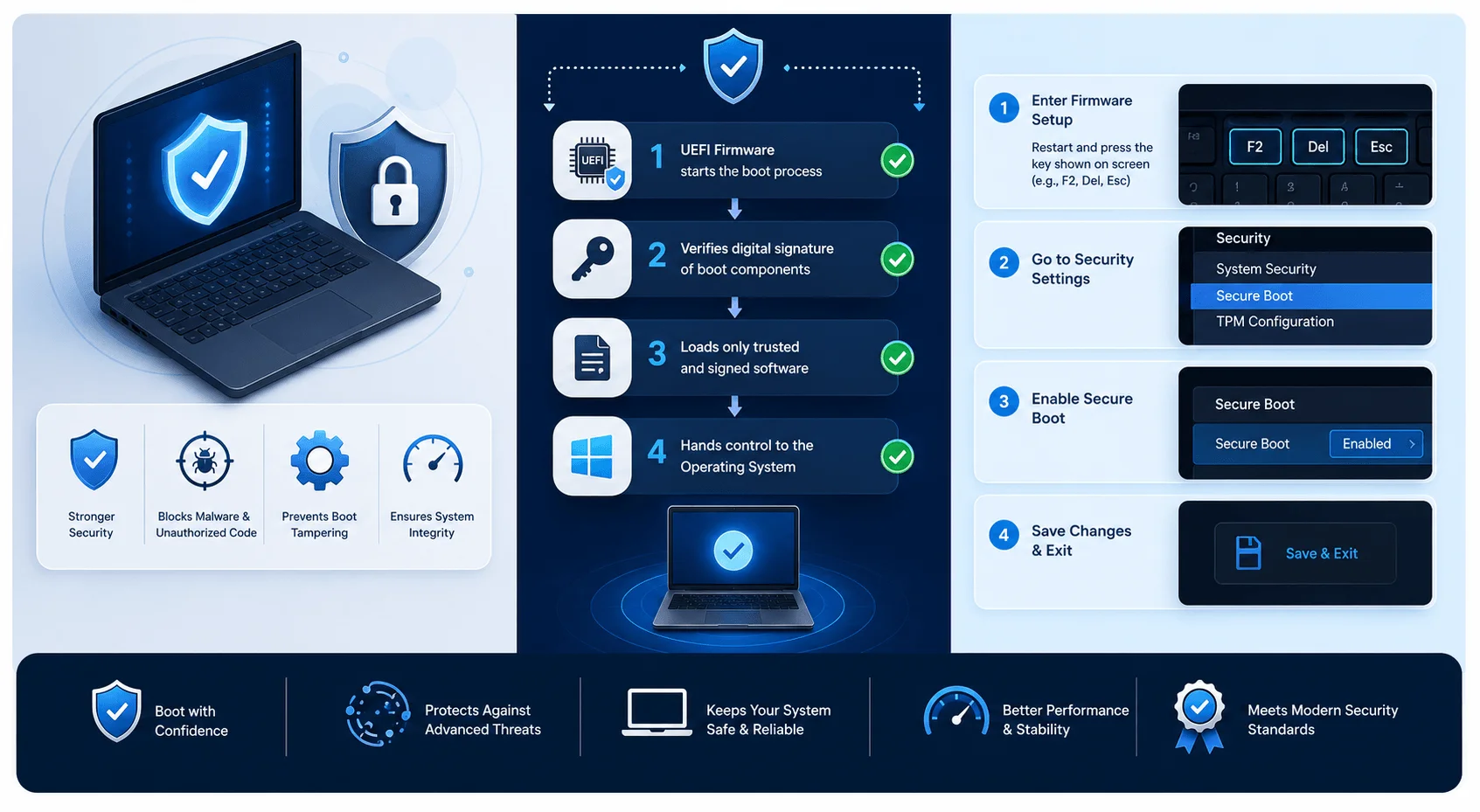
Secure boot works like a relay race. Each component hands off to the next only after proving it's authorized to run. Break one checkpoint, and the whole boot process stops.
This handoff system is called the chain of trust, built around four key databases stored in firmware.
Database | Role | Who Controls It |
|---|---|---|
Platform Key (PK) | Root of trust; authorizes KEK updates | Device manufacturer |
Key Exchange Key (KEK) | Authorizes updates to db and dbx | OS vendors, hardware makers, IT admins |
Signature Database (db) | Allow list of trusted hashes/keys | Set by firmware/OS vendor, user-editable |
Forbidden Signature Database (dbx) | Block list of revoked or compromised hashes | Updated via security patches |
As AWS explains, the PK database contains a single public key used to authorize KEK updates, and changing it requires the matching private key. JumpCloud notes that KEK entries let different vendors manage db and dbx independently, without needing PK-level access for routine signature updates.
The Boot Sequence Step-by-Step
Here's what happens when a Linux system with secure boot enabled powers on:
Firmware initializes and locates the first-stage bootloader, called shim.
Shim gets verified against the vendor's certificate stored in firmware.
Shim verifies GRUB 2, checking its signature for tampering.
GRUB verifies the kernel against the vendor certificate or a user-enrolled hash.
The kernel loads once every signature checks out, completing the boot.
A failure at any step halts the boot process. Nothing loads without a valid signature.
Secure Boot Isn't a Lockdown Tool
A common misconception is that secure boot exists to lock you into one vendor's ecosystem. The Debian Wiki clarifies that secure boot isn't meant to prevent users from controlling their own systems. You can enroll your own keys, sign your own software, or remove manufacturer keys entirely so firmware trusts only what you've signed yourself.
This is exactly why shim exists: Linux developers built it so open-source operating systems could work with secure boot without depending on a single vendor as gatekeeper.
Real-World Attacks That Exposed Secure Boot's Weak Points
Secure boot has known, documented bypasses. Here are the most significant ones.
BlackLotus: The First Bootkit to Bypass Secure Boot
In 2023, ESET confirmed that BlackLotus became the first publicly known UEFI bootkit able to bypass secure boot on fully patched Windows 11 systems.
BleepingComputer reported that BlackLotus could disable BitLocker encryption, Microsoft Defender, and Hypervisor-protected Code Integrity. It was sold on hacking forums for roughly $5,000, with cheaper rebuilds available separately.
The attack exploited a flaw known as "Baton Drop," tracked as CVE-2022-21894. It rolled back the Windows Boot Manager to an older version not yet listed in the forbidden signature database, then exploited that older version.
The Follow-Up Flaw: CVE-2023-24932
Huntress's analysis describes CVE-2023-24932 as a bypass allowing attackers with admin or physical access to run untrusted code during boot, establishing persistence that standard antivirus and EDR tools cannot detect. Microsoft confirmed that patching alone was not enough; administrators had to manually revoke trust in the older, vulnerable boot managers.
Can a TPM Prevent This? No
A Trusted Platform Module (TPM) does not actively block bootkits like BlackLotus. The NSA's BlackLotus Mitigation Guide states that a TPM can only detect BlackLotus, not prevent it, because boot binaries load after TPM measurements are already recorded. The TPM functions as an observer of integrity data, not an active enforcer. This is why Measured Boot exists as a companion feature, logging kernel and driver measurements so administrators can spot tampering after the fact.
How to Check and Manage Secure Boot on Your PC
Restart your PC and enter firmware settings (usually F2, F10, Delete, or Esc during startup).
Open the Boot or Security tab in the UEFI/BIOS menu.
Locate Secure Boot and check whether it's enabled.
Enable it if disabled, unless a specific dual-boot or legacy hardware requirement needs it off.
Check for firmware updates regularly, since updates often include revoked signature list changes.
Avoid disabling secure boot for convenience. NSA guidance states no modern endpoint built in the last several years should run with it off.
A Timely Update for 2026
Microsoft has confirmed it is updating secure boot certificates originally issued in 2011, which are set to begin expiring in June 2026. If you manage multiple devices, tracking this update matters, since expired certificates without proper updates can cause boot failures or leave systems unprotected.
Common Mistakes to Avoid
Disabling secure boot to install unsigned software. This is a signal to investigate the software, not a routine workaround.
Assuming secure boot stops all malware. BlackLotus proved sophisticated attackers can bypass it. It's one layer, not a complete defense.
Skipping firmware updates. Manufacturers push revocation list updates specifically to block known exploited boot managers.
Confusing TPM with active protection. A TPM detects tampering after the fact; it does not stop an attack in progress.
FAQ: Secure Boot Questions Answered
Is secure boot the same as a TPM?
No. Secure boot verifies signatures before software loads and blocks unsigned code. A TPM stores measurements and can detect tampering after boot, but it doesn't actively block malicious code from loading.
Can secure boot be disabled?
Yes, most firmware allows disabling secure boot. Disabling it removes protection against firmware-level malware and is not recommended for typical use.
Does secure boot stop all malware?
No. Secure boot blocks unsigned or tampered boot components, but documented bypasses like BlackLotus show that sophisticated attackers can circumvent it using vulnerable, signed software.
Do I need secure boot for Windows 11?
Yes. Windows 11 requires secure boot support as part of its system requirements, alongside a TPM 2.0 chip.
Can Linux run with secure boot enabled?
Yes. Most major Linux distributions support secure boot through shim, a signed first-stage bootloader built for this purpose.
What happens if a boot signature fails verification?
The boot process halts at that stage, preventing the unsigned or tampered component from loading.
Why is Microsoft changing secure boot certificates in 2026?
Certificates issued in 2011 are approaching expiration. Microsoft is issuing updated certificates to prevent boot failures and maintain the security of the signing chain.
Conclusion
Secure boot verifies digital signatures on every component involved in starting a computer, using a chain of trust built from the Platform Key, Key Exchange Key, and the allow and deny signature databases. It's not a complete defense on its own. Real attacks like BlackLotus show that determined attackers can find bypasses. Still, it remains one of the most effective defenses against firmware-level malware that traditional antivirus tools cannot detect. Keep it enabled, keep firmware updated, and check your system settings using the steps above.
Written by

Alex
Creative blogger sharing insights, stories, and fresh ideas.