What Is a URL? Complete Guide to Web Addresses (2026)

A URL (Uniform Resource Locator) is the web address used to locate a specific resource — like a webpage, image, or file — on the internet. It tells your browser which protocol to use, which server to contact, and exactly which resource to retrieve. Below, you'll find a complete breakdown of how URLs work, their components, and how to optimize them for SEO.
You've typed a URL into your browser a million times. But have you ever stopped to ask yourself what's actually happening when you hit enter?
I know, I know — it sounds like a boring question. But stick with me here, because understanding what a URL is (and how it works) is one of those foundational things that makes everything else about the web click into place — including your site's technical SEO and domain strategy.
Let's get into it.
What Is a URL, Exactly?
So here's the deal.
A URL stands for Uniform Resource Locator. In plain English? It's the web address you use to find something online — a page, an image, a video, a PDF, whatever.
Think of it like a street address for the internet. Just like your house has a unique address so the mail carrier knows exactly where to drop off your package, every single resource on the web has a unique URL so your browser knows exactly where to fetch it from.
According to Britannica, a URL is a compact string of numbers, letters, and symbols that a computer uses to find a resource on a network and act upon it. The URL format was standardized in 1994 by the IETF (Internet Engineering Task Force) — and Tim Berners-Lee, the inventor of the web, was part of that group.
URL vs. URI vs. URN: The Quick Comparison
People mix these terms up constantly, so here's a table that clears it up fast:
Term | Full Name | What It Does | Example |
|---|---|---|---|
URI | Uniform Resource Identifier | Umbrella term — identifies any resource |
|
URL | Uniform Resource Locator | Identifies a resource and tells you where to find it |
|
URN | Uniform Resource Name | Identifies a resource by name, not location |
|
The takeaway: every URL is a URI, but not every URI is a URL. That's the whole rule.
The Anatomy of a URL (Breaking Down Every Part)
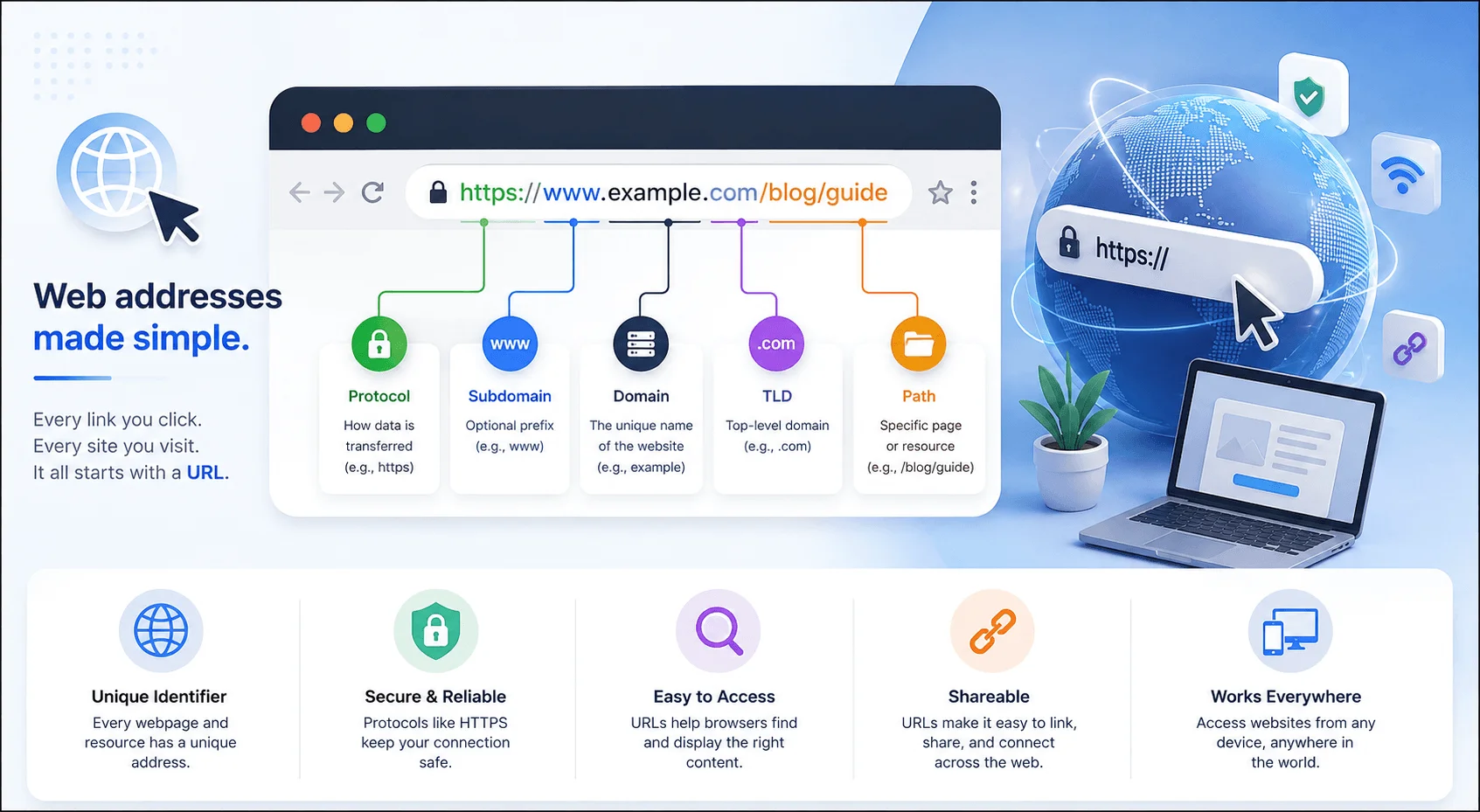
A URL isn't just one random blob of text. It's made up of several distinct components, and each one has a specific job. Here's the breakdown.
1. The Scheme (or Protocol)
This is the first part of any URL — the bit before the colon, like http or https.
The scheme tells your browser how to talk to the server. You've almost certainly seen these: HTTP (Hypertext Transfer Protocol) — the original protocol for transferring web data — and HTTPS (HTTP Secure) — the encrypted, more secure version. If you've ever run into a redirect issue, it's worth understanding how HTTP status codes like 302 work and how to fix them
HTTPS uses TLS encryption and runs over port 443, while HTTP runs over port 80 with zero encryption. As of 2026, over 95% of page loads in Chrome happen over HTTPS, and Google continues to treat it as a confirmed ranking signal.
Why This Matters for You
If you're running a site without HTTPS in 2026, that's a real problem — both for security and for rankings. Visitors also expect that padlock icon; its absence alone can tank trust and conversions.
2. The Domain Name
Next up is the domain name — the part everyone recognizes, like google.com or wikipedia.org.
This is the human-friendly name that maps to a computer's actual IP address. Without domain names, you'd be typing strings of numbers into your browser every time you wanted to check email.
3. Subdomains
You'll often see something before the domain name, like blog. or www. That's a subdomain — a way of organizing different sections of a website. mail.google.com and drive.google.com share a domain but point to different "rooms."
4. The Path
After the domain, you'll usually see a slash followed by text — something like /blog/what-is-a-url. That's the path, pointing to a specific page or file. This is one of the most important parts for SEO.
5. Query Parameters
Sometimes you'll spot a question mark followed by text, like ?utm_source=newsletter&id=42. These are query parameters, passing extra data to the server — tracking info, filters, session IDs. They're structured as key-value pairs, separated by & when there's more than one.
6. The Anchor (or Fragment)
A hashtag (#) at the end of a URL is called an anchor or fragment identifier. It jumps the browser to a specific spot on a page — like a table-of-contents link.
7. URL Encoding (Percent-Encoding)
One thing most guides skip: URLs can only contain a limited set of characters. Spaces, special characters, and non-ASCII symbols get converted into a format like %20 (a space) through a process called URL encoding. So my file.pdf becomes my%20file.pdf in a URL. This matters if you're building links programmatically or troubleshooting broken links.
8. Maximum URL Length
There's no official length limit in the URL spec, but practically speaking, most browsers support URLs up to around 2,000 characters, and Google recommends keeping indexed URLs well under that for usability and crawl efficiency.
How a URL Actually Works (Step-by-Step)
Here's what actually happens between you typing a URL and a webpage appearing:
You type the URL into your browser's address bar and hit enter.
DNS translation happens. Your browser uses the Domain Name System (DNS) to convert the domain into an IP address.
A request gets sent to the server that owns that IP address.
The server responds, gathering the needed files — HTML, CSS, images — and sending them back.
Your browser renders the page, assembling the data into what you see.
All of this happens in a fraction of a second.
URL vs. Domain Name: What's the Real Difference?
A domain name is one piece of a URL — not the whole thing.
A URL is the complete internet address of a webpage, while a domain name is just the organization's name plus its top-level domain (TLD), like .com or .org.
So example.com is a domain name. https://example.com/blog/seo-tips is the full URL. Every URL contains a domain; not every mention of a domain is a full URL.
Why URLs Matter for SEO
Your URL structure isn't just a technical detail — it's a genuine ranking factor, and it sits at the intersection of both traditional and AI-driven search. If you're weighing where to focus your efforts, this breakdown of GEO vs. SEO is a useful next read
A 34,000-keyword study by CognitiveSEO found that including your target keyword in your URL can meaningfully improve your odds of ranking closer to position one. It's not a magic bullet, but combined with strong content, it adds up.
Search Intent and Your URL
Before worrying about structure, nail search intent first.
Ask yourself: what is someone actually trying to accomplish when they search your target keyword? Informational, transactional, or navigational? Your URL, title, and content all need to reflect that intent consistently — a mismatch is a fast way to lose rankings.
Your main keyword should appear in:
The URL itself (e.g.,
/what-is-a-url)The page title
The first 100 words of your content
The H1 tag
At least one H2 tag
This isn't keyword stuffing — it's making sure search engines and readers instantly understand what the page covers.
Best Practices for SEO-Friendly URLs
Keep it short. Easier to read, remember, and share.
Make it descriptive. Include your primary keyword.
Use hyphens, not underscores. Search engines read hyphens as spaces.
Avoid unnecessary parameters. Skip session IDs where possible.
Stay consistent. Pick lowercase and stick with it site-wide.
Use HTTPS. Always. No exceptions in 2026.
One more thing worth checking: make sure your robots.txt file isn't accidentally blocking the URLs you've worked hard to optimize — a common and easy-to-miss mistake
Well-structured URLs give clear signals to crawlers and visitors — directly influencing click-through rates and rankings, according to Bluehost.
Common Types of URLs You Should Know
Type | Description | Example |
|---|---|---|
Absolute URL | Full address including scheme and domain |
|
Relative URL | Shortened, path-only version used within a site |
|
Canonical URL | Preferred version when duplicate content exists |
|
Vanity URL | Short, branded URL used for marketing |
|
Frequently Asked Questions
Is a URL the same as a web address?
Yes — "URL" and "web address" are used interchangeably. Technically, "web address" is just the informal name for a URL.
Can a URL contain spaces?
No. Spaces must be converted into %20 through URL encoding, since raw spaces break the URL format.
What's the maximum length of a URL?
There's no strict spec limit, but most browsers cap functional support around 2,000 characters. For SEO, shorter is better.
Can two websites have the same URL?
No — URLs are meant to be unique identifiers. Two different domains can have identical paths (e.g., /blog), but the full URLs will always differ.
Is a domain name the same as a URL?
No. A domain name is just one component of a URL. The full URL includes the scheme, domain, path, and often more.
Wrapping This Up
A URL is your address book entry for everything on the internet — it tells your browser what protocol to use, which server to contact, and which exact resource to grab.
If you're building a website, getting your URL structure right isn't optional — it's foundational technical SEO work that pays off every time someone searches for what you offer.
You now know more about URLs than most internet users. Go put it to good use.
Read more: AOL Mail (295): What It Means + How to Log In Safely
Written by
Alex
Creative blogger sharing insights, stories, and fresh ideas.