What Does BCC Mean in Email? Guide & Examples


BCC mean for blind carbon copy. Anyone you add to the Bcc field gets your email, but their address stays hidden from every other recipient. You use it to protect email privacy, tidy up group messages, and avoid reply all chaos.
You've seen that little "Bcc" link next to the "To" field.
Maybe you've ignored it for years. Honestly? I did too.
Then one careless send showed me why it matters. Below, I'll show you what it does, when to use it, and how to dodge the mistakes that cost real organizations real money.
What Does BCC Stand For in Email?
BCC stands for blind carbon copy. Sounds fancy, right?
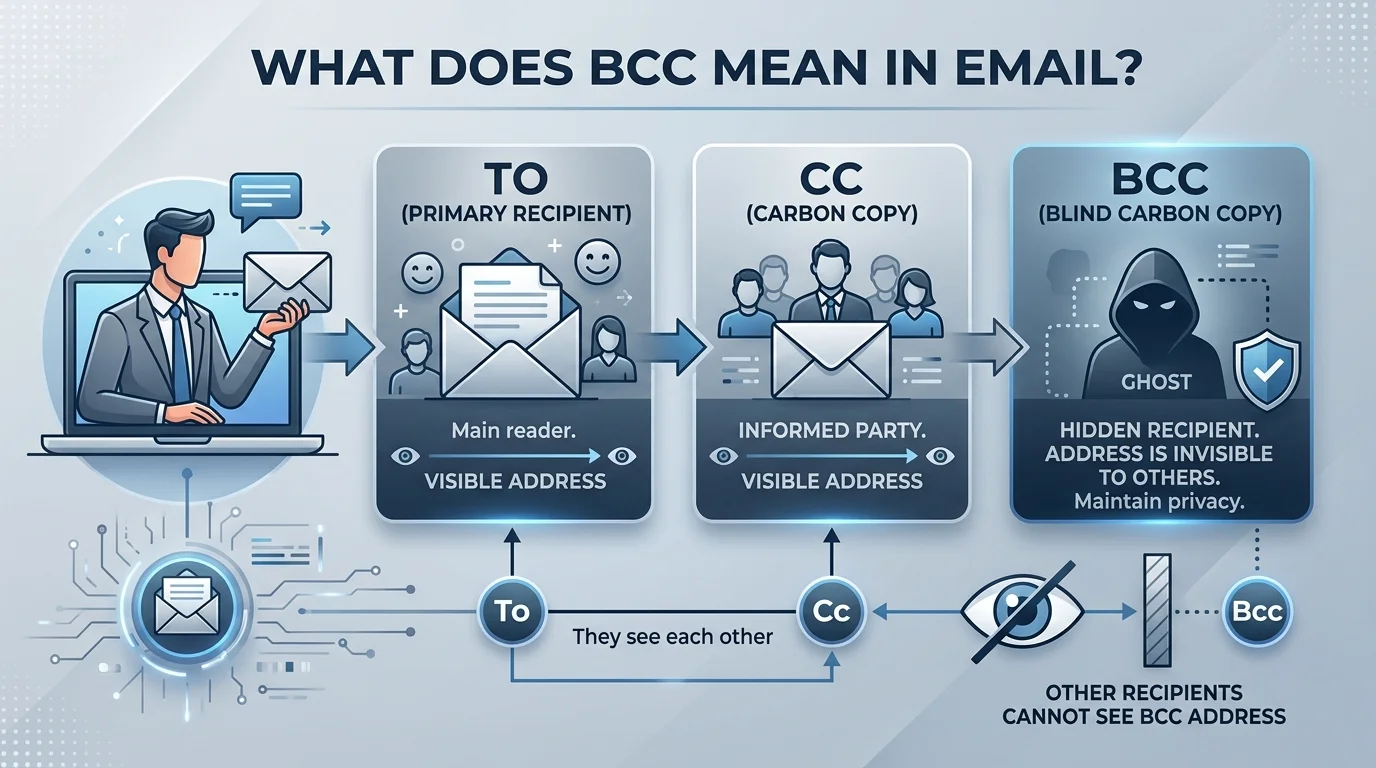
It isn't. The BCC meaning boils down to one idea: you include someone without showing their address to anyone else.
Let's unpack where the term came from, because it makes the whole thing click.
Where the Term Comes From
Long before inboxes, people slipped carbon paper between two sheets to make a duplicate. That duplicate was the carbon copy.
Email borrowed the idea. Then came the "blind" version, so hidden recipients could be included without the others knowing.
Some people read it as "blind courtesy copy", which is a backronym. Same function, friendlier name.
BCC vs CC: What's the Difference?
Here's where most people get tangled up.
Both fields send an extra copy of your message. The difference is visibility. CC (carbon copy) shows everyone who else got the email. BCC hides them.
Here's the quick comparison:
Field | Who sees the address? | Best used for | Expected to reply? |
|---|---|---|---|
To | Everyone | Main recipients who need to act | Yes |
CC | Everyone | Keeping people in the loop | No |
BCC | Only you | Privacy, newsletters, large lists | Not usually |
One handy rule of thumb: CC is for transparency, BCC is for privacy.
Also, because BCC recipients stay hidden, they can't kick off a giant reply all thread by accident. Your team will thank you.
How Does BCC Work Behind the Scenes?
Ever wondered how your email app pulls off the disappearing trick? It's not magic. It's a standard.
The email header rules come from RFC 5322, the document that defines the Internet Message Format. It treats the Bcc line as a list of addresses that shouldn't be revealed to the other recipients.
What the Standard Says
According to this breakdown of RFC 5322, mail systems have three permitted options at send time.
First, they can strip the Bcc line from every copy. Second, they can remove it from the To and CC copies but keep it on the blind copies. Third, they can send an empty Bcc line to signal that hidden copies went out.
Even better, the RFC warns that systems must still handle replies carefully so a blind recipient isn't accidentally exposed.
Most modern email clients handle all of this for you. You just type and hit send.
How to Use BCC: A Step by Step Guide
Ready to try it? Good.
The Bcc field is usually hidden by default, so many people never find it. This takes under a minute, and you'll use it for mass emails, announcements, and any long distribution list.
How to BCC in Gmail
Open Gmail and click Compose.
Click the Bcc link next to the Cc field, as HubSpot's guide explains.
Type or paste your recipients' addresses, separated by commas.
Write your subject line and message.
Double check every field, then hit send.
Quick tip: on mobile, tap the small expand arrow near the To field first.
Once your list grows, you'll also want to find old threads fast. Our guide to the Gmail newer_than operator shows you how to search recent messages in seconds.
How to BCC in Outlook
Start a new email.
Go to Options, then choose Bcc, as IONOS describes.
Add your recipients to the Bcc box.
Compose your message and send.
Pretty painless, right?
When Should You Use BCC?
Knowing the button is one thing. Knowing when to press it is another.
Use BCC to protect recipients' contact information, send a newsletter, or contact people who don't know each other. Avoid it when you're trying to be sneaky.
Smart Times to Use BCC
Sending an announcement to a big group where addresses should stay private.
Emailing a club, class, or customer list.
Keeping a private record of a message.
Preventing a reply all mess.
Sharing a scanned file with several people at once. If you need help with that, read our guide on how to scan to email.
But here's my honest warning. If you'd feel awkward explaining why someone was secretly copied, skip BCC. Use it for discretion, never for deception.
The Costly Mistake: Using CC Instead of BCC
Now for the scary part.
Mixing up these fields isn't just embarrassing. It can be a data breach.
The UK's data regulator fined the Central YMCA £7,500 after emails to 264 addresses used CC instead of BCC, exposing people on an HIV support programme. The fine was originally recommended at £300,000.
Likewise, NHS Highland was reprimanded after a newsletter went to 37 patients without BCC.
And it's not rare. The ICO says failing to use BCC correctly sits in the top 10 breaches that are not cyber attacks, with nearly a thousand reported since 2019. Education is the biggest offender, followed by health.
The European Data Protection Board treats it seriously too. Its guidelines list a marketing email sent with visible To or CC addresses as an example of a personal data breach.
So, what can you do?
Pause before sending. Read every field.
Turn on a send delay so you can fix errors.
For large or sensitive lists, skip BCC and use mail merge or a bulk email service, which the ICO itself recommends.
Know Your Limits
Watch recipient limits too. Gmail and Outlook cap total recipients at roughly 500 across all fields. Go over, and your message may bounce or get flagged as spam.
Frequently Asked Questions About BCC
What does BCC mean in email?
BCC means blind carbon copy. Recipients in this field receive your message, but their addresses are hidden from everyone else.
Can BCC recipients see each other?
No. Bcc recipients can't see each other, and people in the To and CC fields can't see who was blind copied.
Does the person in the To field know I used BCC?
Generally not. They see only the To and CC lists, though some systems may show an empty Bcc line, as the RFC permits.
What's the difference between CC and BCC?
CC shows everyone who received the email. BCC hides those recipients.
Is it OK to only use BCC?
Yes. Leaving To empty and adding everyone to BCC works in many email apps, though some clients require at least one address in To.
Is BCC safe for sensitive lists?
Not on its own. The ICO has said relying on BCC alone isn't always an appropriate safeguard, so use a bulk email tool for sensitive groups.
Final Thoughts: Stop Risking Your Contacts' Privacy
So, what does BCC mean in email?
It means blind carbon copy: a simple way to include people without exposing them. Use it well, and your email etiquette improves overnight.
But BCC works best for small, low risk sends. Once you're emailing a real list, manual fields are a gamble you don't need to take.
That's why I recommend a proper email marketing platform like Mailchimp. It keeps every subscriber's address private automatically, so one wrong click can never leak your list.
Ready to protect your contacts and look professional? Sign up today, send your next campaign the safe way, and stop worrying about the To, CC, and BCC fields for good.
Written by
Alex
Creative blogger sharing insights, stories, and fresh ideas.