What Is a Keylogger? Complete Guide + How to Detect It


A keylogger is spyware — software or a physical device — that secretly records every key you press and sends that data to an attacker. It can capture passwords, credit card numbers, and private messages without any visible sign that it's running. Keyloggers usually get onto your device through phishing emails, infected downloads, or malicious websites, and they remain one of the most common tools used in credential theft today.
I've dug into how these things actually work, how they sneak onto your devices, and — most importantly — how you can catch one before it does real damage. Let's break it down.
What Is a Keylogger, Exactly?
A keylogger is spyware that sits between your keyboard and your screen, silently copying down everything you type.
According to CrowdStrike, keyloggers, or keystroke loggers, are tools that record what a person types on a device — and while there are legitimate uses (more on that below), most real-world use is malicious.
There's a subtle distinction worth knowing. Keystroke logging is the activity of recording your keystrokes. A keylogger is the tool — the program or device — that does the recording.
Why This Matters to You
Your keystrokes are basically the master key to your digital life. Every password, email, and banking detail flows through your keyboard first. If someone captures that stream, they don't need to hack anything else — you've handed them the front door key.
How Does a Keylogger Actually Work?
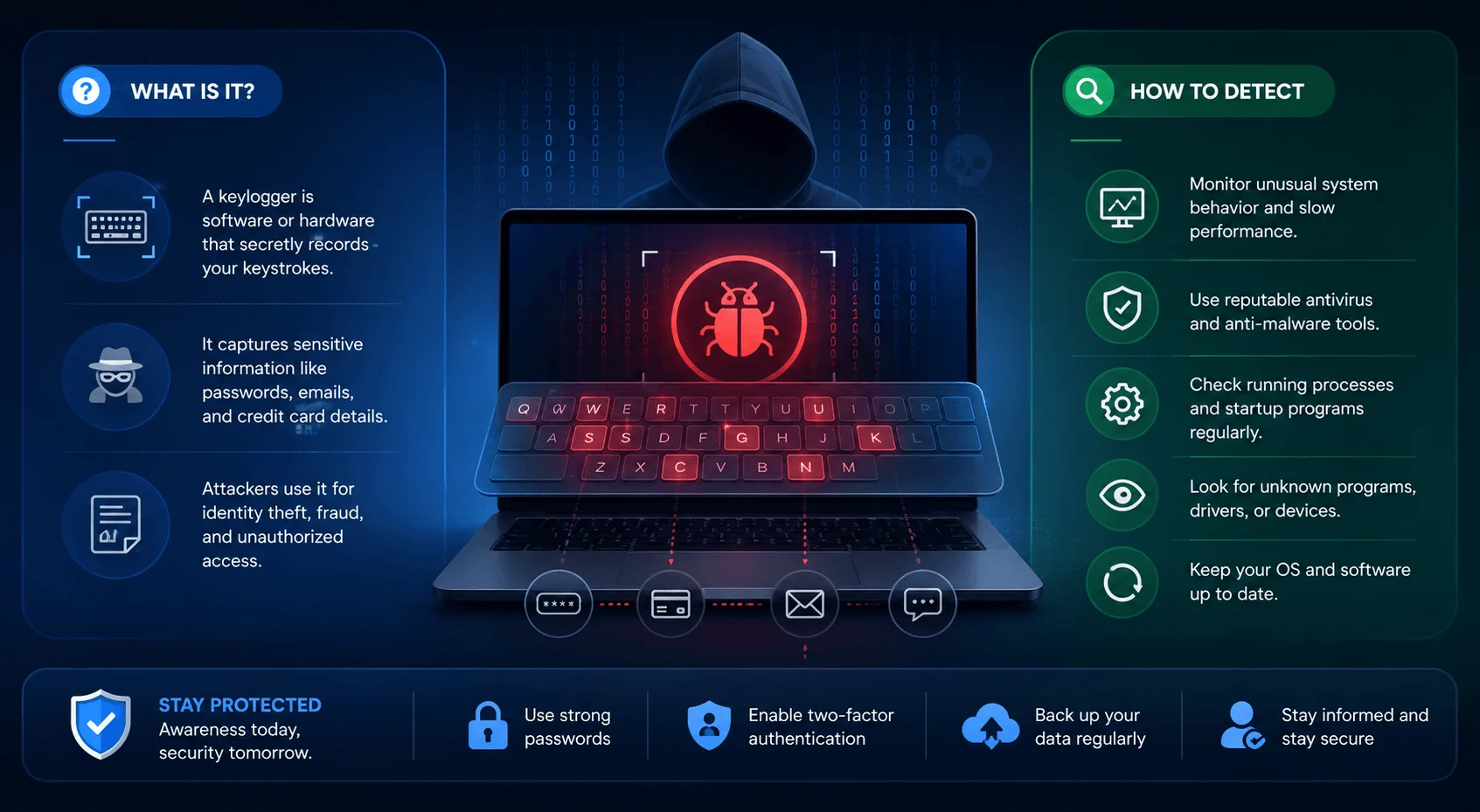
Once installed, a keylogger begins recording immediately and transmitting data without your knowledge.
Per CrowdStrike, keyloggers track every keystroke and save it into a file. That file either gets emailed automatically to the attacker or retrieved manually. Some advanced versions, called screen recorders, also capture screenshots at random intervals.
Keyloggers can also be selective. Attackers can program one to watch for the @ symbol, since that usually signals an email address — often followed by a password. This lets attackers skip the junk text and jump straight to the valuable data.
On the technical side, McAfee explains that most software keyloggers operate at the kernel level the deepest layer of your operating system — intercepting the raw signal from your keyboard before you even see the letter on screen. That's why they're so hard to catch with the naked eye. This is closely related to how Secure Boot works to prevent unauthorized, low-level code from running during startup, which is one reason enabling it can help block certain kernel-based threats before they ever load.
Types of Keyloggers: Quick Comparison
Not all keyloggers work the same way. Here's how the main types compare:
Type | How It Works | Detection Difficulty |
|---|---|---|
API-based | Intercepts keyboard APIs, logs keystrokes to a system file | Moderate — antivirus can often catch it |
Form-grabbing | Captures text entered into web forms before submission | Moderate — browser scans help |
Kernel-based | Burrows into the OS core for admin-level access | Hard — deeply hidden, may evade standard scans |
Browser-based | Hides in extensions/scripts, grabs login fields | Moderate — check extensions regularly |
Hardware | Physical device between keyboard and computer/USB port | Easy — visible on physical inspection |
Mobile | Tracks touchscreen taps, sometimes camera/mic too | Hard — often disguised as a normal app |
Software keyloggers are the most common overall, since they can be deployed remotely at scale. Hardware keyloggers are rarer but easier to spot once you know to check your ports.
A Quick History Lesson
Back in the mid-1970s, Soviet spies built a hardware keylogger that targeted IBM Selectric typewriters inside the US Embassy in Moscow. It detected tiny magnetic changes as the print head rotated to strike each letter — no wires required, according to Malwarebytes.
Soviet embassies reportedly preferred manual typewriters for classified documents specifically to avoid this kind of electric surveillance, per Cyble.
Commercial keyloggers took off in the mid-to-late 1990s and have since grown into a market with thousands of products across multiple languages and use cases.
Is Using a Keylogger Ever Legal?
Yes, in limited cases. Per Cyble, keylogging without consent is illegal because it violates privacy laws. Legal exceptions include employers monitoring company-owned devices with employee knowledge.
There's also the parental monitoring use case. According to Proofpoint, parents sometimes install keyloggers on a child's device to track chat activity and protect against online threats — not for malicious surveillance.
So the tool itself isn't inherently harmful. Intent and consent are what determine legality.
How Do Keyloggers Get Onto Your Device?
According to Avast, infection typically follows this pattern:
A cybercriminal sends an infected message — a phishing email, text, or malicious link.
You click the attachment or link.
The keylogger silently downloads in the background.
It immediately starts collecting keystrokes, often undetected until a scan catches it.
Another common method is drive-by downloading, where malware installs itself just from visiting a compromised website — no download click required.
Keyloggers also frequently hide inside Trojan horse malware — software that looks legitimate on the surface but deploys malicious code once opened. This is why learning to recognize phishing emails is one of your best first lines of defense.
Real-World Example: The DarkHotel Attack
CrowdStrike documented an attack called DarkHotel, where hackers targeted unsecured hotel Wi-Fi networks and tricked guests into downloading malicious software. Once installed, it functioned as a keylogger, reporting keystrokes back to the attackers before deleting itself after collecting enough data — a tactic designed specifically to avoid detection.
For context on scale: phishing remains the top delivery method for credential-stealing malware including keyloggers, according to recent industry threat reporting from vendors like Proofpoint and CrowdStrike, reinforcing why email vigilance is still your first defense in 2026.
Signs You Might Have a Keylogger (Step-by-Step Checklist)
Step 1: Watch for typing delays. Fortinet notes a keylogger sits between your keyboard and monitor, which can cause a slight lag between pressing a key and seeing it appear.
Step 2: Monitor device performance. Trend Micro flags slowdowns in browsing, laggy mouse movement, or graphics errors — though well-built keyloggers may cause no noticeable slowdown at all.
Step 3: Check for pop-ups or browser changes. Mailfence recommends watching for unexpected pop-ups, altered browser settings, or unfamiliar background programs.
Step 4: Monitor network activity. Keyloggers must transmit stolen data somewhere, so unusual spikes in network traffic are worth investigating, per Mailfence.
Step 5: Open your task manager. Keeper Security recommends checking for unfamiliar apps alongside slower performance or cursor lag. On Android specifically, it also helps to check and stop apps running in the background, since a keylogger disguised as a background process can quietly drain resources without ever appearing in your app drawer.
Step 6: On mobile, check battery and data usage. Rapid battery drain, unusual data consumption, or unfamiliar apps can point to a mobile keylogger, per Mailfence. If you're comparing platforms, it's also worth understanding the broader differences between Android and iOS security, since keylogger risk and detection methods vary depending on which mobile OS you're using.
How to Remove a Keylogger From Your Device
Disconnect from the internet immediately — this stops further data from reaching the attacker, per Mailfence.
Run a full antivirus scan using an up-to-date anti-malware tool, per iolo.
Manually remove suspicious apps and extensions — keyloggers sometimes hide inside browser extensions.
Boot into Safe Mode for a deeper system check and reset browser/app settings, per Trend Micro.
As a last resort, reset your device if threats persist.
One honest caveat: even strong antivirus software sometimes misses a well-designed keylogger, per Keeper Security, since these tools are built to be deceptive. Pair software scans with the behavioral checklist above.
For a hardware keylogger, no antivirus scan will help — you'll need to physically inspect your keyboard cable and USB ports, per Check Point.
How to Prevent Keyloggers in the First Place
Keep software updated — Trend Micro recommends patching your OS, browser, and apps regularly to close security holes keyloggers exploit.
Use real-time antivirus protection rather than occasional manual scans, per How-To Geek.
Avoid "bonus" software offers bundled into installers — a common infection point.
Don't click unknown links in emails from unfamiliar senders or on unsecured websites.
Review app permissions regularly, especially on mobile devices, to catch unauthorized access early.
Frequently Asked Questions
Is a keylogger illegal?
It depends on consent. Using a keylogger without the device owner's knowledge is illegal in most jurisdictions because it violates privacy laws. It's legal in specific cases, such as employer monitoring of company devices with employee knowledge, or parental monitoring of a minor's device.
Can antivirus software detect all keyloggers?
No. Even top antivirus tools sometimes miss well-designed keyloggers because they're built to evade detection. Combining antivirus scans with behavioral awareness — like checking for typing lag or unusual network activity — gives you better protection.
Can iPhones and Android phones get keyloggers?
Yes. Both platforms are vulnerable to mobile keyloggers that track touchscreen input, and in some cases, camera or microphone activity. Signs include rapid battery drain, unusual data usage, and unfamiliar installed apps.
What's the difference between a keylogger and general spyware?
A keylogger is a specific type of spyware focused only on recording keystrokes (and sometimes screenshots). Spyware more broadly can also track browsing history, location, files, and app usage.
How do I know if a keylogger is hardware or software?
Hardware keyloggers are physical devices attached between your keyboard and computer, usually visible on inspection. Software keyloggers run invisibly on your operating system and require an antivirus scan or manual process check to detect.
Do keyloggers only target computers?
No. Keyloggers target computers, smartphones, and tablets. Mobile keyloggers record touchscreen taps instead of physical key presses.
Final Thoughts
Keyloggers are real, common, and often invisible until damage is already done. But once you know the warning signs and prevention steps, you're already ahead of most people.
Run that antivirus scan today, review your browser extensions, and stay skeptical of unfamiliar links going forward. Your keystrokes — and everything they protect — are worth defending.
Written by
Alex
Creative blogger sharing insights, stories, and fresh ideas.