Vector vs Raster: The Real Difference (2026 Guide)

Raster images are made of pixels and are best for photos and detailed artwork, while vector images are made of mathematical formulas and scale infinitely without losing quality — making them ideal for logos, icons, and print work. Here's everything you need to know about Vector vs Raster to pick the right one, every single time.
Okay, real talk — I've spent way too many hours staring at pixelated logos wondering why they looked crisp on my screen but garbage on a billboard. If that's you right now, welcome to the club. Let's fix this once and for all.
In this guide, I'm going to break down vector graphics vs raster graphics in a way that actually makes sense — no jargon-soup, no confusing textbook explanations. Just practical stuff you can use today (updated for 2026, including the AI-powered tools everyone's using now).
What Even Is a Raster Image?
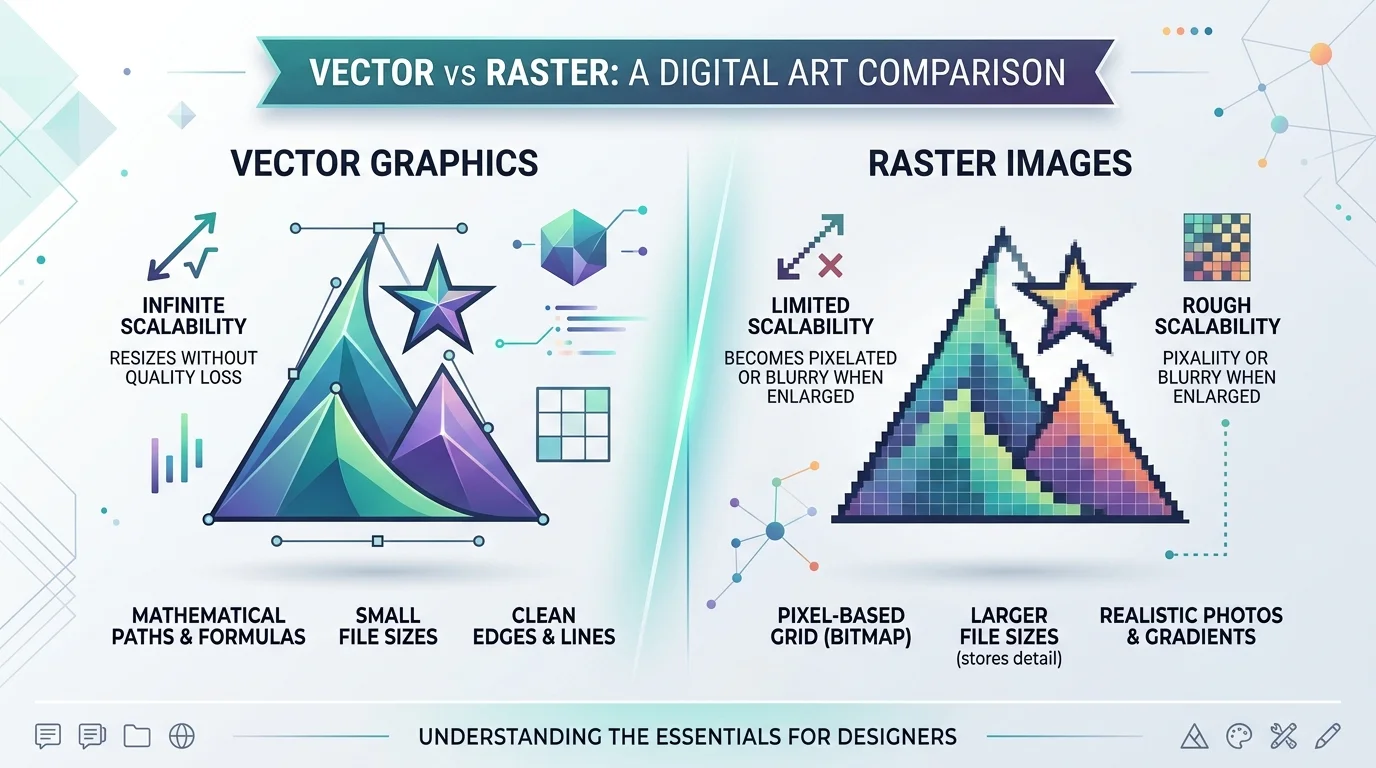
Here's the thing about raster images — they're basically digital photographs made of tiny colored dots. Think of it like a mosaic. Zoom in far enough, and you'll see the individual tiles. If you've ever wondered what those individual tiles are actually called, check out our guide on what is a pixel — it's the building block of everything in this section.
The Technical Bit (Kept Simple)
A raster graphic — also called a bitmap image — is built from a fixed grid of pixels. Each pixel carries its own color data. Stack thousands (or millions) of them together, and boom — you've got a photo.
But here's the catch. Because raster images have a fixed resolution, they don't scale well. A standard 640×480 image stores info for roughly 307,200 pixels — but a 6-megapixel photo needs over 6.2 million. Try blowing up a small JPEG to poster size, and you'll get that ugly, blocky pixelation we've all seen on a badly-printed flyer. Not cute.
This is measured in DPI (dots per inch) or PPI (pixels per inch) — the higher the number, the crisper the image, but also the bigger the file.
Common Raster File Formats You'll Run Into
JPEG — best for photos, but it compresses (and loses some quality) to keep file sizes small
PNG — supports transparency, great for web graphics and logos with sharp edges
GIF — limited to 256 colors, but perfect for small animations
TIFF — the heavyweight champ of quality, favored by professional photographers
WebP — the modern web darling; roughly 60% smaller than PNG at similar quality
So when should you actually use raster? Honestly — anytime realism matters. Photography. Digital painting. Anything with subtle shading, gradients, or texture, also known as color depth. Raster wins that fight every time.
Now Let's Talk About Vector Graphics
This is where things get fun.
Why Math Makes These Images Bulletproof
Unlike raster, vector graphics aren't made of pixels at all. They're built from mathematical formulas — points, lines, and curves that a computer calculates on the fly.
I know, I know — "math" and "design" don't usually sound like they belong in the same sentence. But stick with me here, because this is genuinely the coolest part.
Since vectors are just formulas, you can scale them up to the size of a building or down to a favicon, and they'll stay perfectly crisp. No pixelation. No blur. Nothing lost. That's why scalability is basically the vector superpower.
Where Vector Files Shine
Logo design — because your brand needs to look sharp on a business card and a highway billboard
Icon design and UI elements
Typography and text-heavy graphics
Infographics and charts that need to stay legible when zoomed
And the file formats you'll see most often? SVG (the gold standard for the web), AI (Adobe Illustrator's native format), and EPS (still the universal go-to for print production).
A quick 2026 update: AI-assisted vectorization tools have gotten genuinely good this year — you can now turn a rough sketch or even a text prompt into a clean SVG in seconds. If you're curious about the broader AI image space, our roundup of the best free AI image generators in 2026 covers a few tools worth trying for this exact use case.
Vector vs Raster: Side-by-Side Comparison
Here's the cheat sheet I wish someone had handed me years ago:
Feature | Vector | Raster |
|---|---|---|
Built from | Mathematical formulas (paths) | Pixel grid (bitmap) |
Scalability | Infinite, no quality loss | Fixed resolution, degrades when enlarged |
Best for | Logos, icons, typography, print | Photos, digital painting, textures |
Common formats | SVG, AI, EPS, CDR | JPEG, PNG, GIF, TIFF, WebP |
File size | Generally smaller | Generally larger (especially at high DPI) |
Editability | Reshape paths anytime, no quality cost | Editing degrades quality over repeated saves |
Web use | Ideal for interactive/animated elements | Ideal for realistic imagery |
Print production | Required by most professional printers | Often rejected for logos/signage |
The Core Difference, In One Sentence
If you remember nothing else from this article, remember this:
Raster = pixels. Vector = math.
That's it. That's the whole ballgame. Everything else — the pros, the cons, the use cases — flows from that one distinction.
Step-by-Step: How to Decide Which One You Need
I get asked this constantly, so let's make it dead simple.
Step 1: Ask yourself — does this need to scale? If you're designing a logo, icon, or anything that'll appear at multiple sizes (business card and billboard), go vector. Every time.
Step 2: Is it a photograph or does it have complex shading? Photos, digital paintings, textured artwork — these are raster's home turf. Vector graphics genuinely struggle to replicate that kind of realism.
Step 3: Where's it going — web, print, or both? For the web, SVG is your best friend for interactive elements since it plays nicely with CSS and JavaScript. For print production, vector is basically mandatory — most professional printers and sign makers won't even accept a low-res raster file.
Step 4: Check your file size constraints Vector files are typically lighter than raster ones — a simple 100×100 shape can be a fraction of the size of its PNG equivalent — because they're storing formulas, not millions of individual pixel values.
Step 5: When in doubt, keep both A lot of professional projects blend the two. A brochure might use a vector logo alongside raster photography. There's no rule against mixing — and PDFs commonly combine both in a single file. If you're working with raster photos that need cleanup before combining them with vector elements, our guide on how to remove the background from an image is a good next step.
Common Mistakes I See People Make Constantly
Mistake #1: Saving a raster image as an SVG and calling it "vectorized." This doesn't actually convert anything — it just stuffs the pixel data inside an SVG wrapper. You end up with a bigger file that's still just as blurry when scaled.
Mistake #2: Using raster images for charts and diagrams. That screenshot of your spreadsheet chart? Looks fine at 1x but blurs out immediately on a retina screen. Charts and diagrams should basically always be vector.
Mistake #3: Expecting vector tools to handle photo-realistic images well. Vectors are incredible for clean, flat designs. But complex photographs with gradients and textures are simply not their strong suit. Don't force it.
FAQ: Vector vs Raster
Can I convert a raster image to vector?
Yes, through a process called vectorization or image tracing — but it works best on simple, high-contrast images like logos. Complex photos rarely convert cleanly.
Which format is better for a logo?
Vector, always. Specifically SVG for digital use and EPS or AI for print — this ensures your logo stays sharp from a favicon to a billboard.
Why won't my printer accept my PNG logo?
Because raster files are resolution-limited. Printers need files that scale to any size without pixelating, which only vector formats guarantee.
Is SVG a raster or vector format?
Vector. It's XML-based and describes shapes mathematically, which is why it's the standard for web icons, charts, and logos.
What's the best raster format for the web in 2026?
WebP, in most cases — it combines the strengths of JPEG, PNG, and GIF while producing notably smaller file sizes.
Wrapping This Up
So here's your cheat sheet, one more time:
Need something that scales infinitely without losing quality? Go vector.
Working with photography or complex color gradients? Go raster.
Building for the web with interactive elements? SVG, every time.
Sending files to a professional printer? Vector, non-negotiable.
Once you internalize this distinction, you'll never second-guess a file format choice again — and honestly, that confidence alone is worth the time you just spent reading this.
Got a logo that's still stuck in pixel-land? Now's the time to get it properly vectorized — your brand (and your printer) will thank you.
Written by
Alex
Creative blogger sharing insights, stories, and fresh ideas.