What Is a Motherboard Chipset? Full 2026 Guide

A motherboard chipset is a set of chips (or a single chip on modern boards) that manages how data flows between your CPU, RAM, storage, and peripherals. It determines which features your PC supports: overclocking, PCIe lane count, USB ports, and more. As of September 2026, the main options are Intel's Z790 and B760, and AMD's X670 and B650.
I still remember the first time someone asked me "what's a chipset?" and I just froze. Was it the CPU? A random sticker? Honestly, I had no clue. If you're here because you Googled the same question, don't worry, you're in good company.
By the end of this guide, you'll know exactly what a motherboard chipset is, how to check which one you have, and which one you should actually buy. If you're not fully clear on what a motherboard itself does, that's worth a quick read first, it'll make this guide click faster. Let's get into it.
What Is a Chipset, Really?
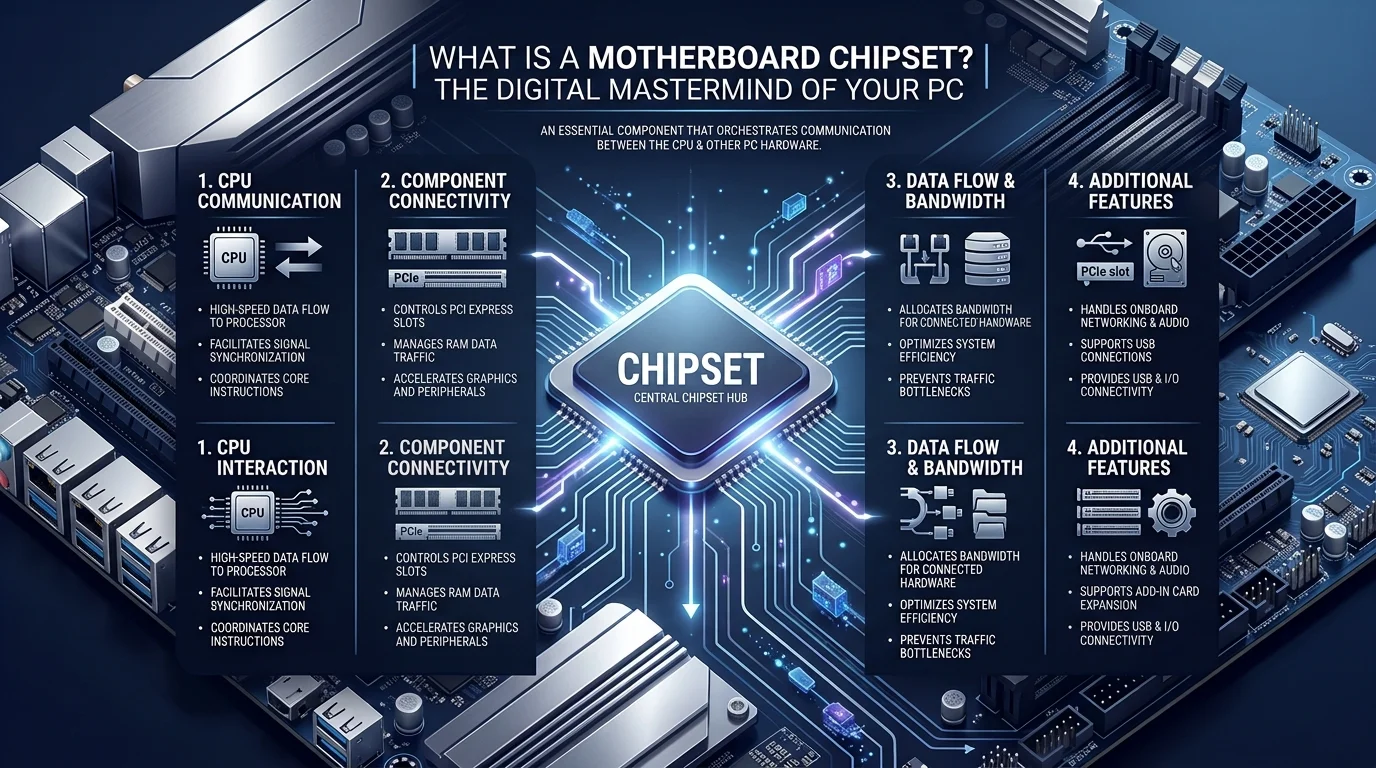
Think of your motherboard as a city. The CPU is the mayor making big decisions. Your RAM, storage, and USB ports are the neighborhoods. The chipset is the entire road and traffic light system connecting everyone.
In plain English: a chipset is a set of chips on your motherboard that manages data movement between your CPU, memory, storage, and peripherals. Without it, your components can't talk to each other.
The first PC chipset, the NEAT chipset, shipped in 1984 for the Intel 80286. This isn't a new invention. It's been quietly running the show for over 40 years.
The Old School Design: Northbridge and Southbridge
For decades, chipsets were split into two physical chips. Once you understand this split, everything else clicks into place.
The Northbridge
The northbridge sat closest to the CPU, connected via the front side bus. It handled the fast stuff:
System RAM access
Graphics card communication (via AGP or early PCIe)
Direct CPU to memory traffic
The Southbridge
The southbridge handled slower, less time sensitive tasks: USB ports, SATA drives, audio. It didn't talk to the CPU directly; everything routed through the northbridge first.
How Modern Chipsets Work
Here's something that trips people up: modern motherboards don't use the northbridge/southbridge split anymore. CPU manufacturers moved the northbridge's job directly into the CPU. Memory controllers and PCIe lanes are now baked into the processor.
What's left on the motherboard is a single chip called the Platform Controller Hub (PCH). It handles USB ports, SATA connections, networking, and other I/O functions. When you see a chipset name like Z790, B760, X670, or B650, that's the PCH doing the work.
Intel vs. AMD Chipset Comparison (2026)
Here's exactly how the current generation chipsets stack up, based on published specs from Corsair and PCComponentes:
Feature | Intel B760 | Intel Z790 | AMD B650 | AMD X670 |
|---|---|---|---|---|
Socket | LGA1700 | LGA1700 | AM5 | AM5 |
CPU overclocking | No | Yes | Yes (EXPO) | Yes (EXPO) |
Memory overclocking | Yes (XMP) | Yes (XMP 3.0) | Yes | Yes |
Chipset PCIe 4.0 lanes | 10 | 20 | Fewer (single chip) | Up to 12 |
Chipset PCIe 3.0 lanes | 4 | 8 | None | Up to 8 |
SATA III ports | 4 | 8 | Up to 8 | Up to 8 |
USB 3.2 Gen 2x1 | Up to 6 | Up to 10 | Fewer | Up to 12 |
Best for | Mainstream builds | High end/enthusiast | Mainstream builds | Enthusiast/workstation |
My take: unless you specifically need overclocking headroom or heavy multi drive storage, the budget tier boards (B760, B650) deliver most of the real world performance for less money.
Step by Step: How to Pick the Right Chipset
Decide on Intel or AMD. This locks your socket: LGA1700 for Intel, AM5 for AMD.
Ask if you want to overclock. If yes, pair an unlocked CPU (Intel's "K" series) with Z790, or any AMD Ryzen chip with B650/X670.
Match your budget to a chipset tier. B series boards are cheaper; Z series and X series unlock extra I/O and tuning.
Check PCIe lane count and storage support. More lanes mean more room for NVMe SSDs, graphics cards, and expansion cards.
Confirm RAM speed support via XMP or EXPO profiles.
How to Check Which Chipset You Already Have
If you're not building from scratch and just want to know what's already in your PC:
Windows: Open Device Manager, expand "System devices," and look for an entry naming your PCH (e.g., "Intel(R) 700 Series Chipset").
Third party tools: Free utilities like CPU Z show your chipset under the "Mainboard" tab.
Manufacturer specs: Check your motherboard's product page or the sticker/box it came in.
Do You Need to Update Chipset Drivers?
Yes, and it's often overlooked. Chipset drivers tell your operating system how to communicate with the PCH. Outdated drivers can cause USB dropouts, storage detection issues, or missed performance gains after a BIOS update.
Download updates directly from Intel's official driver support page or AMD's chipset driver page, never third party sites. This is one of the few driver categories worth checking manually every few months.
Why This Matters for Your Next Build
Pick the wrong chipset, and you'll hit a wall: no room for a second NVMe drive, no overclocking headroom, no Wi Fi 6E support. Don't cheap out on the chipset to save $30. It's the foundation everything else builds on.
If you're planning a full build from scratch, my step by step guide on how to build a PC walks through every component decision, including where the chipset fits alongside your CPU, RAM, and GPU choices.
Frequently Asked Questions
What's the difference between a chipset and a CPU?
The CPU processes instructions and calculations. The chipset (PCH) manages communication between the CPU and everything else: storage, USB, networking.
Can I upgrade my chipset without replacing my motherboard?
No. The chipset is soldered onto the motherboard, so upgrading it means buying a new board.
Does chipset affect gaming performance?
Indirectly. The chipset itself doesn't render frames, but it affects storage speed, RAM overclocking headroom, and how many devices you can run simultaneously, all of which can bottleneck a build.
Is Z790 worth it over B760 if I'm not overclocking?
Usually not. If you don't plan to overclock and only need one or two fast drives, B760 delivers nearly identical real world performance for less money.
How often should I update chipset drivers?
Check every few months, or immediately after a major Windows update or BIOS update, since compatibility issues often show up there first.
Final Thoughts
A motherboard chipset is the unsung hero connecting your CPU, memory, and peripherals. It evolved from the northbridge/southbridge duo into today's streamlined Platform Controller Hub, and picking the right one, Z790, B760, X670, or B650, genuinely shapes what your PC can do.
Match the chipset to your actual needs: overclocking, storage, future upgrades, and you'll thank yourself later. Got questions about your specific build? Drop them below, I read every comment.
Written by
Alex
Creative blogger sharing insights, stories, and fresh ideas.