How to Know If Someone Blocked You (2026 Guide, All Apps)

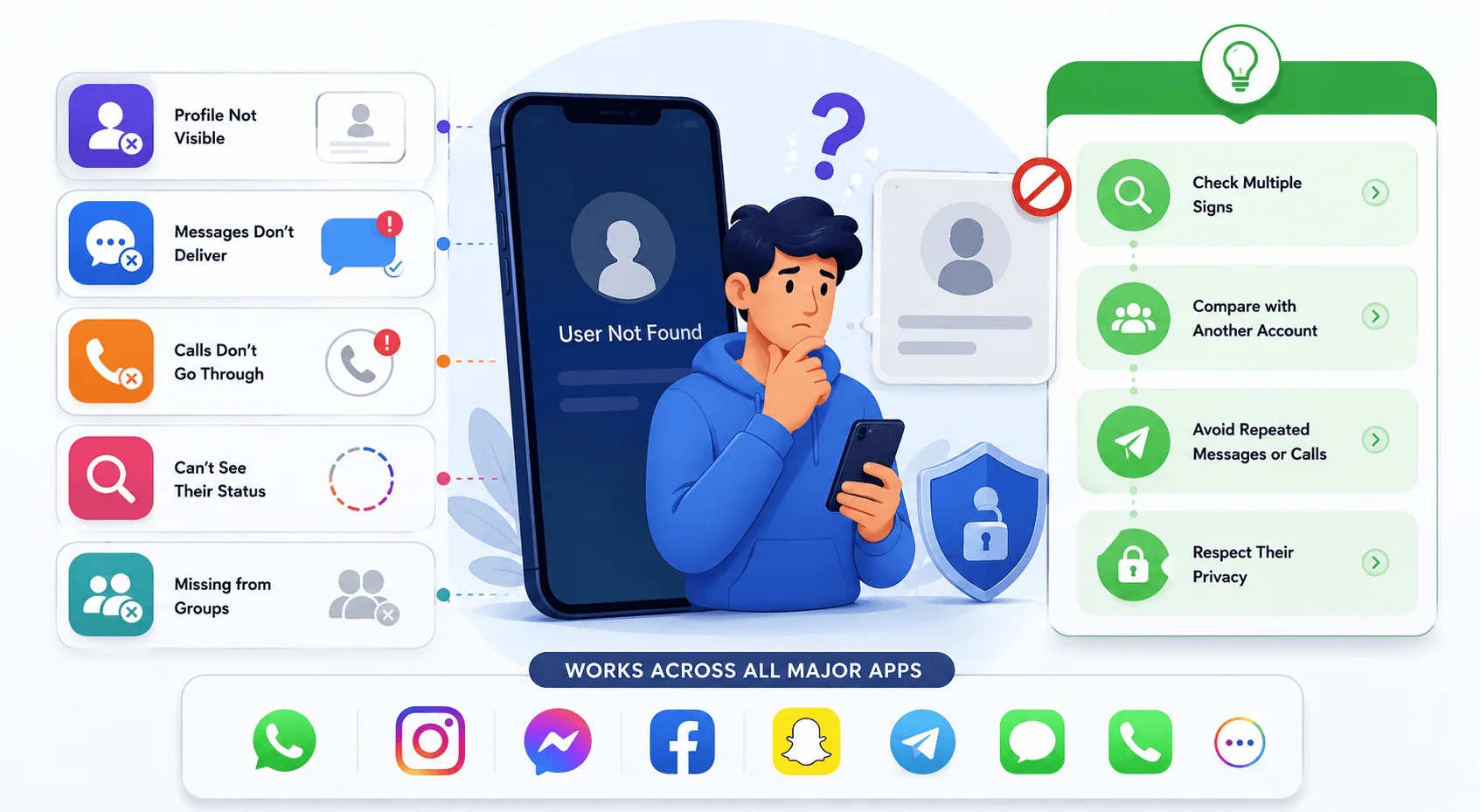
Quick answer: You can usually tell if someone blocked you by checking a few consistent signs — messages that never show "Delivered," calls that go straight to voicemail, a profile that suddenly won't load, or a missing "last seen" status. No single sign is 100% proof, but if you notice several of these at once across a day or two, it's very likely you've been blocked.
Now let's get into the details.
I'll be honest with you — the moment you start wondering "did they block me?" is never a fun moment.
Maybe your texts stopped showing "Delivered." Maybe their profile just... vanished. Maybe you called and it rang once, then straight to voicemail. And now you're here, refreshing their profile for the fifth time today.
I get it. I've been there too.
So in this guide, I'm going to walk you through exactly how to know if someone blocked you — across iPhone, WhatsApp, Instagram, Facebook, and X — using real, tested signs current as of 2026. And at the end, I'll talk about the part nobody really covers: what being blocked actually does to you emotionally, and how to move past it.
If you're curious about blocking from the other side, I've also covered how to block websites on Chrome and Android. Let's get into it.
Why It's So Hard to Know for Sure You've Been Blocked
Here's the annoying truth: almost no app wants to tell you that you've been blocked.
Seriously. Apple won't tell you. WhatsApp won't tell you. Instagram won't tell you. They're all designed to protect the privacy of the person doing the blocking — which is a nice feature for them, and a maddening mystery for you.
That said, blocking isn't invisible. It leaves fingerprints. Delivery statuses change. Profile pictures disappear. Calls behave weirdly. None of these signs are 100% proof on their own — but when you stack a few together, the picture gets pretty clear.
The one major exception? X (formerly Twitter), which actually tells you outright with an on-screen message. We'll get there.
How to Know If Someone Blocked You on iPhone (Calls & Texts)
If you're on iOS in 2026, you actually have some of the most reliable blocked number signs available — you just need to know where to look.
If you're not sure whether an iPhone or Android quirk is behind what you're seeing, it's worth checking out this breakdown of Android vs. iOS security differences — some of these "blocked" symptoms are actually just platform-specific behavior.
According to iPhone Life's testing across recent iOS versions, including iOS 26, calling is genuinely the single best way to check. Here's why: it removes a lot of the guesswork that texting introduces.
Step 1: Call Them Once
Dial their number normally.
If it rings once (or not at all) and jumps straight to voicemail → that's a strong signal.
If it rings normally several times before going to voicemail → they're probably just not answering.
This lines up with what 9meters found in their own testing — calls going straight to voicemail without a normal ring cycle is one of the clearest indicators something's off.
Step 2: Check Your iMessage Status
Send a text.
Watch for:
No "Delivered" status appearing under your message
The bubble switching from blue to green, meaning it fell back to SMS
Now — quick reality check — a green bubble doesn't automatically mean you're blocked. MacObserver's iOS 18 guide points out it might just mean iMessage failed to connect, which happens for lots of harmless reasons too.
Step 3: Rule Out the Obvious Stuff First
Before you jump to conclusions, check:
Is their phone possibly off or dead?
Are they somewhere with no signal?
Could Do Not Disturb be on?
Honestly, ruling this stuff out first will save you a lot of unnecessary anxiety.
Step 4: Combine the Signals
Justin Lavelle, Chief Communications Officer at BeenVerified, told Reader's Digest that the trick is comparing your last known "Delivered" message to your most recent one. If everything after a certain point stopped delivering — that's your clearest clue.
Pro tip: Test more than once, across a couple of days. One weird moment isn't proof. A consistent pattern is.
How to Know If Someone Blocked You on WhatsApp
WhatsApp is trickier than iPhone texting, mostly because it hides so much by default anyway. But there are still solid WhatsApp blocked contact signs you can check.
Per Simyo's breakdown of WhatsApp indicators, here's what changes when you've been blocked:
The Checkmark Test
You already know the checkmarks:
One grey check = sent
Two grey checks = delivered
Two blue checks = read
If your message is stuck on one grey checkmark — forever — that's a meaningful sign, according to SheetWA's testing.
Missing Last Seen and Online Status
If their last seen and online status just... disappeared, one of two things happened: they turned on privacy settings, or they blocked you.
The Profile Photo Disappears
Airalo's guide notes their profile pic either vanishes completely or turns into a static grey avatar that never updates again.
Calls Won't Connect
Try calling them on WhatsApp. If the call just doesn't go through at all — not even ringing — that's another data point.
The Strongest Signal: Try Adding Them to a Group
This one's underrated. According to Folk's guide, if you try adding them to a WhatsApp group and get an error saying you're not allowed to add them — that's about as close to confirmation as you'll get on this app.
The Delete-and-Re-Add Trick
Here's a workaround a lot of people swear by, mentioned by Airalo: delete the contact entirely, then re-add them. If their profile info stays completely blank even after re-adding, it strongly suggests a block.
How to Know If Someone Blocked You on Instagram
Instagram ghosting is its own special kind of confusing. One day they're there, the next — poof.
Let's break down the real Instagram blocked profile search signs, based on ElectronicsHub's guide.
Search for Their Profile
Type their username into search.
If you get "User Not Found" or "No Posts Yet" → strong sign of a block
If the profile loads with zero followers, zero following, zero posts → also suspicious
Check Your DM Thread
Open your old conversation with them. Per LinkedIn Pulse's Instagram breakdown, a blocked thread often shows the name "Instagram User" with a blank profile picture.
Try the Follow Button
Tap Follow. If it instantly unfollows itself — that's not a glitch. That's Instagram quietly telling you no.
The Confirmation Trick: Check From Another Account
This is honestly the fastest way to actually confirm it. GetAssist's community forum recommends viewing their profile from a second account, a friend's account, or an incognito browser.
If their profile shows up perfectly fine there? You've got your answer.
Old Comments and Tags Might Still Be Visible
One weird quirk — Reader's Digest notes that Instagram doesn't wipe old comments or tags from your own profile, even after a block. So you might still see a comment they left months ago while being completely unable to find their current profile. Confusing, but it happens.
While you're troubleshooting Instagram oddities, it's also worth knowing how Instagram's live and visibility features work — it'll help you understand what's a privacy setting versus what's an actual block.
How to Know If Someone Blocked You on Facebook or Messenger
Facebook blocking behaves a little differently than Instagram, mostly because Messenger has its own separate signals.
According to this Messenger breakdown, here's what to look for:
Your messages show "Sent" but never move to "Delivered"
Their profile picture and status updates disappear entirely
Searching their name in Messenger returns nothing
Important distinction: blocking is not the same as unfriending. If you're just unfriended, your messages still land in their inbox — they just don't see you as a friend anymore. Blocking cuts that off completely.
Verify Through Mutual Friends
thinglabs suggests checking whether a mutual friend can still see their profile, or whether their name still shows up in a group you're both part of. If a friend sees them fine and you don't — that's a block, not a deactivated account.
How to Know If Someone Blocked You on X (Formerly Twitter)
Good news — this is the one platform where you don't have to play detective.
Per Avast's overview of cross-platform blocking signs, simply navigate to their profile. If you're blocked, X shows you a direct on-screen message: "@username blocked you."
No guessing. No combining signals. Just a straight answer — assuming their account is still active and not deactivated.
Blocked vs. Other Explanations (Comparison Table)
Before you convince yourself you've been blocked, run through this quick checklist:
What You're Seeing | Could Also Mean |
|---|---|
No "Delivered" status | Dead phone, no signal, Airplane Mode |
Green bubble instead of blue | iMessage temporarily unavailable |
Missing "last seen" | Privacy setting change |
Profile not appearing | Deactivated or deleted account |
Calls not connecting | Poor signal, Do Not Disturb enabled |
I know it's tempting to jump straight to "they blocked me." But ruling out the boring explanations first will save you a lot of stress.
Signal Reliability by Platform
Not all signs carry the same weight. Here's how I'd rank them by confidence level:
Platform | Most Reliable Signal | Confidence Level |
|---|---|---|
iPhone / iMessage | One ring then straight to voicemail | High |
Blocked error when adding to a group | High | |
Profile loads fine on a second account, not on yours | High | |
Facebook / Messenger | Mutual friend sees profile, you don't | Medium-High |
X (Twitter) | On-screen "blocked you" message | Confirmed |
Any platform | Missing "last seen" or online status alone | Low |
A Simple Step-by-Step Method to Confirm You're Blocked
Here's how I'd approach it, start to finish:
Call once — note how it behaves
Send one text — check delivery status
Search their social profiles — from your main account
Re-check from a second account or incognito browser
Wait 24–48 hours and repeat the test
Ask a mutual friend to check, if it's still unclear
If the same pattern shows up across multiple platforms and multiple attempts — you probably have your answer.
What Being Blocked Actually Does to You (And Why It Hurts So Much)
Okay, let's talk about the part most articles skip entirely.
Being blocked doesn't just feel awkward — it genuinely hurts. And that's not just in your head.
According to Psychreg's research on the psychology of blocking, blocking is a form of social rejection and ostracism, and even brief social exclusion causes real, measurable emotional pain — regardless of how confident or secure you normally feel.
There's actual neuroscience behind this too. Research cited by Conscious Relationship Group found that the brain regions activated during heartbreak closely mirror the regions activated by physical pain. The difference? Physical pain fades in seconds. Emotional pain can linger for weeks.
It's also more common than you'd think. 2025 mental health research cited by Pammargetson found that among people with pre-existing anxiety or depression, 34% reported increased symptoms following a blocking incident — a reminder that this isn't just "overreacting," it's a real emotional event for a lot of people.
On the flip side, it helps to understand why people block in the first place. TalktoAngel's psychology breakdown frames blocking as an act of reclaiming control and setting a boundary — not necessarily an act of cruelty. Sometimes it's less "I hate you" and more "I need space."
If you're thinking about reaching out once emotions cool down, mental health experts quoted by Pammargetson recommend waiting somewhere around 30 to 90 days before revisiting the situation — enough time for the initial sting to settle and for you to think clearly instead of reactively.
Frequently Asked Questions
Does the person know if I checked their profile?
No. Searching for someone's profile or trying to message them doesn't send them any kind of notification, on any platform. You can test as many of these signs as you want, privately.
Will unblocking someone notify them?
No — unblocking is silent on every major platform, including iPhone, WhatsApp, Instagram, Facebook, and X. They won't get an alert either way.
Can they still see my profile or posts if I'm blocked?
No. Blocking is almost always mutual — if they've blocked you, you generally can't see their content, and they can't see yours either, even if you didn't block them back.
What's the difference between being blocked and being ghosted?
Ghosting means someone stops responding but hasn't technically restricted you — your messages still go through, they just don't reply. Blocking actively prevents your messages, calls, or profile views from reaching them at all.
Is there any 100% guaranteed way to know I'm blocked?
Only on X, which shows a direct on-screen confirmation. Every other platform requires combining a few signals — delivery status, profile visibility, calls — since none of them officially confirm it.
Should I try a different number or account to reach them?
It's generally not a good idea. If someone has deliberately blocked you, working around it usually damages trust further rather than resolving anything.
Final Thoughts: What to Do Once You Know You've Been Blocked
So — you've tested it, you've checked multiple platforms, and yeah, it looks like you've been blocked.
What now?
Honestly? Respect it.
I know that's not the answer you wanted, but trying to work around a block — new numbers, fake accounts, asking mutual friends to pass messages — almost always makes things worse, not better.
Give yourself permission to feel whatever you're feeling. It's valid. Then give yourself some space, focus on people who do want to hear from you, and trust that time genuinely does soften this.
Now that you know how to know if someone blocked you, you've got the answer — and that's usually the hardest part.
Written by
Alex
Creative blogger sharing insights, stories, and fresh ideas.