What Is an SSH Key? Full Guide + How to Generate One

An SSH key is a cryptographic credential pair — a public key and a private key — used to securely log into remote servers without typing a password. It's the standard authentication method for developers, sysadmins, and anyone using Git, cloud servers, or SFTP tools. Below, I'll walk you through exactly how it works, which key type to use, and how to generate one yourself.
Now let me tell you how I actually learned this.
I remember the first time I generated an SSH key. I had no idea what I was doing. I just copy-pasted a command from a tutorial and hoped for the best.
Sound familiar?
Well, today I'm going to break down exactly what an SSH key is, how it works, and why it's become the gold standard for secure remote access. No fluff. No jargon-for-the-sake-of-jargon.
Just the stuff you actually need to know.
Let's dive in.
What Is An SSH Key?
So here's the deal.
An SSH key is a secure access credential used with the Secure Shell (SSH) protocol. Think of it as a digital ID card — except instead of a photo and signature, it uses math. Really, really hard math.
Unlike a password, which is something you type and something that can be guessed, stolen, or phished, an SSH key is a key pair. That's two mathematically linked pieces: a public key and a private key.
Here's the analogy that finally made it click for me:
Picture the public key as a padlock. You can hand that padlock out to anyone. Put it on a hundred doors if you want.
The private key? That's the only key that opens all those padlocks.
You never, ever share it.
This setup is called public key cryptography, and it's the backbone of modern key-based authentication.
For more on securing your systems, check out our guide on what secure boot is and how it protects your device from the ground up
Why This Matters For You
I'll be honest — most people don't think about SSH keys until they have to.
Maybe you're setting up GitHub SSH access. Maybe you're SSH-ing into a cloud server for the first time. Either way, you're about to rely on this little pair of files more than you realize.
How SSH Keys Actually Work (In Plain English)
Okay, let's get into the mechanics. I promise to keep this simple.
When you generate an SSH key pair, you're creating two files:
A public key (usually ends in
.pub)A private key (no extension, and it should never leave your machine)
You upload the public key to whatever server, service, or platform you want to access — GitHub, a VPS, AWS, whatever. The private key stays put, on your local machine, ideally protected by a passphrase.
Here's where the magic happens.
When you try to connect, the server sends your client a challenge — basically a puzzle only your private key can solve. Your machine solves it using the private key, sends back proof, and the server checks that proof against your stored public key.
If it matches? You're in.
If it doesn't? Access denied. No password prompt, no guessing games.
This challenge-response dance happens in milliseconds, completely automatically. You won't even notice it's happening.
The Technical Foundation: Asymmetric Encryption
This whole system runs on something called asymmetric encryption.
Unlike symmetric encryption (where one key both locks and unlocks data), asymmetric encryption uses two separate keys that are mathematically related but functionally different.
Data locked with your public key can only be unlocked with your private key. Not the reverse. And critically — you can't reverse-engineer the private key just by having the public one.
That one-way relationship is what makes the entire system secure.
A Quick History Lesson (Because Context Matters)
I like knowing why things exist, not just what they do. So here's a bit of backstory.
SSH was created by Tatu Ylönen, a researcher at the Helsinki University of Technology, back in the 1990s. The trigger? A password-sniffing attack that compromised thousands of university login credentials.
Basically, someone was eavesdropping on unencrypted network traffic and stealing passwords in plain text. Ylönen figured there had to be a better way.
And there was.
SSH replaced older, insecure protocols like Telnet and rlogin, encrypting the entire communication channel between client and host. SSH keys became the preferred authentication method because they solved the fundamental weakness of passwords — humans are bad at creating (and protecting) strong ones.
Types Of SSH Keys: RSA, ECDSA, And Ed25519
Now here's where it gets a little more technical, but stick with me — this part actually matters for your security.
There are a handful of SSH key algorithms you'll run into. Here's a quick side-by-side before I explain each one.
Algorithm | Key Size | Speed | Security Notes | Best For |
|---|---|---|---|---|
RSA | 2048–4096 bits | Slower | Older, widely trusted, needs large keys for safety | Legacy servers, max compatibility |
ECDSA | 256–521 bits | Fast | Relies on NIST curves; some trust concerns | Middle-ground compatibility |
Ed25519 | Fixed 256 bits | Fastest | No fragile parameters, resistant to side-channel attacks | Modern default (recommended) |
RSA
RSA is the OG. It's been the default since basically the beginning of SSH.
RSA's security is based on the difficulty of factoring huge prime numbers. The catch? It needs a big key size to stay secure — 2048 bits minimum, with 4096 bits recommended for anything security-sensitive, per ArchWiki's SSH documentation.
Pros: nearly universal compatibility. Cons: slower, bulkier, and historically prone to implementation bugs when weak random number generators were used.
ECDSA
ECDSA (Elliptic Curve Digital Signature Algorithm) is RSA's leaner cousin. It uses elliptic curve cryptography, which gets you comparable security with a much smaller key size.
The catch here is more political than technical — ECDSA typically relies on NIST-standardized curves, and some cryptographers have raised eyebrows over whether those curves are fully trustworthy.
Is that paranoia? Maybe. But it's worth knowing.
Ed25519 (The Modern Favorite)
If you ask me — and honestly, if you ask most security folks in 2026 — Ed25519 is the one to use.
It's a type of EdDSA built on Curve25519, designed by Daniel J. Bernstein specifically to avoid the implementation pitfalls that plague other algorithms.
Why it's great:
Small, fixed key size (256 bits)
Fast key generation, signing, and verification
No fragile parameters to mess up
Strong resistance to side-channel attacks
The one downside? Really old servers (running OpenSSH versions before 6.5, released in 2014) might not support it. If you're dealing with legacy infrastructure, RSA is still your fallback.
How To Generate An SSH Key: Step-By-Step
Alright, enough theory. Let's actually make one.
I'm going to walk you through generating an Ed25519 key, since that's the current best practice.
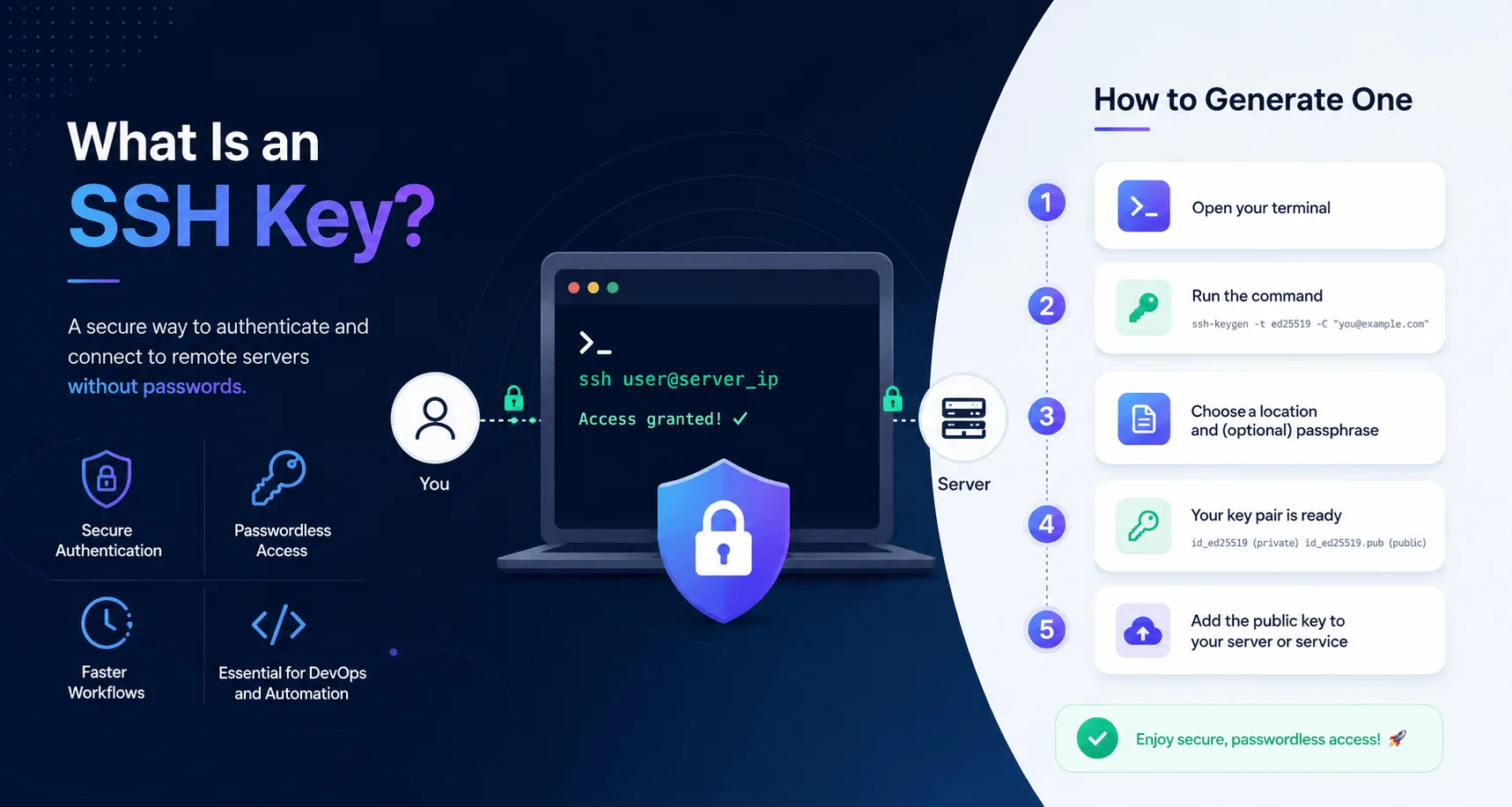
Step 1: Open Your Terminal
On macOS or Linux, just open your terminal app. On Windows, use PowerShell or the built-in OpenSSH client.
Step 2: Run The Key Generation Command
Type this:
ssh-keygen -t ed25519 -C "your_email@example.com"
The -C flag just adds a comment (usually your email) to help you identify the key later. It doesn't affect security at all.
Step 3: Choose A Save Location
You'll be prompted to pick a file location. Unless you have a reason not to, just hit Enter to accept the default (~/.ssh/id_ed25519).
Step 4: Set A Passphrase
This part is important. Please don't skip it.
A passphrase encrypts your private key so that even if someone steals the file, they can't use it without also knowing the passphrase. Think of it as a second lock on your lock.
Step 5: Copy Your Public Key
Once generated, you'll have two files:
id_ed25519(private — never share this)id_ed25519.pub(public — share this freely)
Grab the contents of the .pub file and paste it wherever you need — your GitHub SSH settings, your server's authorized_keys file, your cloud provider's dashboard, wherever.
And that's it. You now have a working SSH key pair.
SSH Key Best Practices You Shouldn't Skip
I've seen a lot of people generate a key once and never think about it again. That's... not great.
Here's what I'd recommend instead.
Use A Strong Passphrase
I know, I know. Typing a passphrase every time feels annoying. But an unprotected private key sitting on a stolen laptop is a disaster waiting to happen.
Use an SSH agent to cache your passphrase temporarily so you're not retyping it constantly.
Rotate Your Keys Periodically
Just like passwords, key rotation matters. If a key's been floating around for years across old servers you don't remember, it's time for a refresh.
Never Share Your Private Key
Seriously. Not with a coworker, not in a Slack message, not in a public repo (yes, this happens more than you'd think).
If your private key ever gets exposed, treat it as compromised immediately — generate a new pair and revoke the old public key everywhere it's registered.
Just like SSH keys protect remote access, other threats target your credentials closer to home. If you're not familiar with how attackers steal login data locally, it's worth reading our breakdown of what a keylogger is and how to defend against one.
Use Different Keys For Different Purposes
Don't reuse the same SSH key across every service you touch. Generate separate key pairs for, say, your personal GitHub account versus your work servers. It limits the blast radius if one gets compromised.
Consider Hardware-Backed Keys
For extra peace of mind, you can store your SSH key on a FIDO/U2F hardware authenticator — a physical security key like a YubiKey. This means even if your laptop is compromised, an attacker still can't extract or use your private key without physical access to the hardware.
SSH Keys vs. Passwords: Why Keys Win
Let's settle this once and for all.
Password-based authentication relies on something you know. SSH key authentication relies on something you have — specifically, the private key file sitting on your device.
That distinction is huge.
Passwords can be:
Guessed through brute-force attacks
Phished
Reused across multiple sites (we've all done it)
Forgotten and reset into weaker versions
SSH keys, on the other hand, are long, mathematically complex, and never transmitted over the network — not even during authentication. The server never actually sees your private key. Ever.
That alone eliminates an entire category of attacks.
This same "something you have vs. something you know" principle shows up across device security too — see our comparison of Android vs. iOS security for how these authentication philosophies play out on mobile.
Where SSH Keys Are Used
You'll bump into SSH keys constantly once you start looking for them. A few common places:
Git and GitHub — for pushing and pulling code without typing credentials every time
Cloud servers — AWS EC2, DigitalOcean droplets, Google Cloud VMs
SFTP file transfers — secure alternatives to plain FTP
CI/CD pipelines — automated deployment systems that need to authenticate without a human typing a password
Remote server administration — sysadmins managing dozens (or thousands) of machines at once
Basically, anywhere secure, repeatable, human-free authentication is needed, SSH keys tend to show up.
Frequently Asked Questions
Is Ed25519 better than RSA?
For most modern use cases, yes. Ed25519 offers stronger security at a much smaller key size and faster performance. Use RSA only when you need to support legacy servers running OpenSSH older than 6.5 (2014).
Can I use one SSH key for multiple accounts?
Technically yes, but it's not recommended. Generating separate keys for different services (personal vs. work, for example) limits the damage if one key is ever compromised.
What happens if I lose my private key?
If you lose your private key but still have access to the server, you can generate a new key pair and update the authorized_keys file. If you lose access entirely and have no backup, you'll need an alternate recovery method (like your cloud provider's console access) to regain entry.
Do I need a passphrase on my SSH key?
Yes. A passphrase adds a second layer of protection, so a stolen private key file alone isn't enough for an attacker to use it.
Is SSH key authentication more secure than a password?
Yes. SSH keys are far longer and more complex than typical passwords, are never transmitted over the network, and aren't vulnerable to phishing or brute-force guessing in the way passwords are.
Final Thoughts
So, is an SSH key complicated? A little, at first.
But once you generate your first one and actually use it, the whole concept clicks pretty fast. You've got a private key that stays home, a public key that goes out into the world, and a clever bit of math that lets the two of them prove your identity without ever exposing your secret.
If you're setting one up today, go with Ed25519 unless you've got a specific reason not to. Protect your private key like it's a house key — because, in a very real sense, it is.
And hey, once you've got the hang of it, you'll probably wonder why you ever put up with typing passwords in the first place.
Written by
Alex
Creative blogger sharing insights, stories, and fresh ideas.